Showing posts with label pictures. Show all posts

Thursday, December 22, 2011

113 - 4t HIT Mail Privacy LITE and Scrambled Egg

113 - steganography series: simple apps to encrypt things from your little brother or sister. test of:
4t HIT Mail Privacy LITE and also Scrambled Egg steganography
==== written Nov.06.2011 by JCPMA©

4t HIT Mail Privacy LITE 1.01 by Niagra Software (2002) can encrypt 250 characters
text into an image.
http://www.4t-niagara.com
It runs on Windows. The source image can be any common format jpg, gif, etc...
Output file is a BMP (or ZIP or HIT archive of the bmp). Zip apps should be able to extract the bmp file from either archive. Checksums of the 3 bmps differ but the decrypted text message is OK.

I performed the encryption process for 3 cycles with two different jpgs.
One cycle gave 3 outputs where the CRC checksum was identical for the 3 versions of bmps.
With the next jpg, the CRC was different for the 3 versions of bmps. I confirmed this by repeating the cycle again but with different text and password.

250 text characters isn't very much. It is about a paragraph. It is however easy to put such a small amount of cipher text into a small image. The smallest jpg I have so far used measures approx. 54x54 pixels. You can probably use a smaller image if you wish.
It appears the output bmp may contain a digital WATERMARK which tells the app that it is an encrypted container. I haven't confirmed this. But for casual use, this will be inconsequential.
It would be nice if this app could output files in other image formats, perhaps jpg, gif, png etc..
This app encodes traditional ANSI text.
It does not encode Unicode text.

My subjective ratings for this app (out of 5 stars):
-overall:3
-ease of use:5
-encryption strength:3
-plausibility/deniability:unknown
-versatility:2

The Copyright © holders have all rights reserved. The software and web documents are provided "as is" without express or implied warranty of any kind by the parties and contributors involved.


4tHITMailPL-ss-etc.png http://www.mediafire.com/?reppiphg8r6hio8
4tHITMailPL-ss-etc.png http://www.box.com/s/xgh5vfbpinfek3blkz43

[image/example]-the password is "password"
outputs are:
130k_G0RD0N.bmp (126KB), http://www.mediafire.com/download.php?9752o0fwjdl9o5g http://www.box.com/s/13alyflnr9opyzi8fb30

130k_G0RD0N.HIT (99KB), http://www.mediafire.com/download.php?gabixidpvbxrwcu http://www.box.com/s/xxnia662xh33tf6g7xa4 and

130k_G0RD0N.zip (99KB). http://www.mediafire.com/download.php?qscc32r3d85yl4r http://www.box.com/s/ghr4fvdkxbu44b5u0iku

[file share folder 4thitmail] http://www.mediafire.com/?x6tkew1hawgex
http://www.box.com/s/0jbuy8099ny81u6x21d8

4tHITMailPrivLite.zip MD5:F4EFA7E141D293CEA31F603DA10A8985
http://www.mediafire.com/download.php?6brdzc4ay7ma9y8
http://www.box.com/s/qhs84id5lnn53fkt4bks

4tHITMailPrivLite.sgn Crypton1.2 signature file
http://www.mediafire.com/download.php?ulas8oge8i7y743 http://www.box.com/s/xpn9gmv1u8y5xvzm0yqg


jcpma2011-public-crypton-key_242A.pbl Crypton1.2 public key
http://www.mediafire.com/download.php?3123o7c1nnlt21t http://www.box.com/s/v846yqiqb405eqs0zgnn

Scrambled Egg 0.4 Portable
===
ŠË is primarily a text to text encryption app. I stumbled onto its steganography feature by accident. Press the "Export" button on the lower right corner and it will export the cipher-text into a square PNG image. The size of the square depends on the amount of cipher-text. The square PNG is an image of noise/static.

Description & user guide for Scrambled Egg
http://www.makeuseof.com/tag/control-text-encryption-scrambledegg/
Download page for Scrambled egg portable 0.4
http://code.google.com/p/scrambled-egg/downloads/list


SummaryTableOfSomeSteganographyApps (ratings out of 5):
###########
App-name
Carrier/Output; CarriedData; (Ease) EncrStength; [Deniab.] Comment;
--------------- ------------ ------ ------------ --------- --------
4t HIT Mail Privacy Lite v1.01
common images/bmp,zip..; text; (5) 3; [unknown] userfriendly

BmpPacker v1.2a
(none)/bmp; anyfile; (3) 4; [0] output is always strips of noise bmp

Camerashy v0.2.23.1
gif/gif; text or basic html; (2) 3; [3] somewhat clunky

Eyemage IIE v0.9.0.1
bmp/bmp; anyfile or text; (4) 4; [4 w.TradPassword] lowerDeniability w Intimakeys. noisyBmpMakingFeature

Jpg+FileBinder v1
jpg/jpg; zip; (3) 0*; [0/low] ok for casual steganography, (*any encryption depends on the zip app used)

Jphs jpeg hide and see v0.5
jpg/jpg; anyfile; (3) 3; [4] hiddenFile's extension is lost

Paperback v1
none/bmp; anyfile; (4) 3; [0/low] practical for small files

Puff v2
png,bmp,others?/same; anyfile; (1) Unknown; [Unknown] MediaFilesAsCarriers; Clunky/low confidence

Scrambled Egg v 0.4 Portable
none/text or png; text; (4) 5; [unknown] pngs are noise/supports Unicode text!
==
In a previous posts, I wrote about some of the picture steganography apps mentioned above.

Wednesday, December 8, 2010

083 - bluebox in your webpage

083 - how to put a bluebox in your (html) webpage using css (tutorial)

click on image for larger size.

Photobucket


082 - Puff v 2 tutorial review

082 - Puff version 2 tutorial and review

081- jpg+ filebinder tutorial and review

081 - jpg+ filebinder tutorial and review

Photobucket
http://s556.photobucket.com/albums/ss4/jcpma/otherTutorials/?action=view&current=jpg-plus-fileBinder.gif
http://i556.photobucket.com/albums/ss4/jcpma/otherTutorials/jpg-plus-fileBinder.gif

Tuesday, November 23, 2010

074 - Nokia 2760 User Guide Manual

document: "1-nokia2760startHere.html"

Nokia 2760 User Guide by a layman; Nokia 2760 cellular phone general notes
written by JCPMA

last updated 2010-11-16; 2010-11-07; 2009-10-31

Nokia's worldwide: http://www.nokia.com

Description:

I made these sets of notes because the documentation on the web and the included
paper documentation are HORRIBLE. I wonder if there is any phone on the market
with decent instructions. It seems, all phone OS's suck. They are clunky and
confusing.
Information I have appreciated or found useful, information which should have been
included in the user manual, is recorded here. [Oct.2009]
INTRO
-----
the Nokia 2760 is a S40 type phone (but i don't know which generation though.)
source [1]

north american gsm dual band phone:
bands: 850MHz and 1900MHz source [2 http://www.speakoutwireless.ca/sim-card-guide/][5]

Speakout sim cards will work on a locked Rogers phone but probably will not work on
a locked Fido phone. [2 (Oct.2009)]


CALLING
-------
Using the speakerphone:
While on an active call, press the Right Soft key to select Loudsp. source [4 document tm51986, 5, 7]

Handset volume:
During a call, you can increase/decrease the volume of the handset by pressing the
right/left cursor key. However, make sure your screen is cleared of all
characters/numbers or else the volume control won't respond. (This is especially
relevant when calling customer service where you are prompted to press 1 or 2 etc...)

Headset: The model-2760 comes with a headset with a button in the center; "Is it a built in mic?
Is the button like a walkie talkie where you push to talk?" or "Does it start the phone
call and end the phone call?" (I wish there was some documentation included.)


CONTACTS
--------
Phone contacts on your sim card:
If you choose to store/use your phone contacts on your sim memory, a sim card icon
will appear on the upper part of the screen. The advantage of this is portability.

The contacts stay with your sim card. The disadvantage, is that the Nokia 2760
will not let you associate a photo/picture with a phone contact, if the storage is
on the sim memory (compared to phone memory). [5] [2009-09-01]
you cannot associate a ringtone/tone to a particular contact.[5] [2009-10-02]


FIRMWARE
--------
[5 (dial *#0000# will show your phone is hardware version eg, RM-259 and a 3 digit firmware version)]
I am unable to find any new firmware for this phone. According to the Nokia,
USA/Europe Websites, there is no software upgrade for this model of phone.[2010-10-27]
I wasn't able to find software available to update current firmware at this site:
http://www.nokia.ca/get-support-and-software/software/device-software-update/can-i-update
source [6, 5(Sept/Oct 2009)] [http://europe.nokia.com; www.nokiausa.com (Oct.2010)]
This link to a list of Nokia firmwares: http://wiki.forum.nokia.com/index.php/Nokia_Firmware_Versions [Nov16.2010]


INTERNET DISABLING
------------------
I found this tip on a Speakout forum[2], I think. You can disable your phone from
accidentally connecting to the internet, for example if you are playing a game and
it decides to connect without your knowledge etc... (I can't remember who the
author is though, but it works.):
Settings-->config-->Personal config-> Add New-> ¤Web-> leave everything blank & save.
Settings-->config-->Default config-> choose PersonalConfig
Settings-->config-->Preferred Access Point-> choose Internet.


POWER
-----
I can get approx. 10-11 days worth of standby time if my phone use is minimal.
It takes me about 2 hours to recharge the battery (that originally comes
with the phone) from a "dead" state to a full charged state.[5]
When the battery level is low to the point of critical, the phone "beeps" once per
minute for a total of 3 minutes. Then, it seems, in the next minute, the phone
"dies"/turns itself off,.[5][2009-10-02]


TEXT/SMS
--------
text quota = 159 characters per sms message
This phone has a bad habit of mixing up your saved texts. That is, if you have
several saved messages, they can be cut and spliced with the body of each other.
"It is quite a messy defect". [5]


TONES
-----
IM Alert tone:
The default is
"Standard" very loud. This one sounds like two "beeps from an Aliens Scanner"
(ie the scanner Ripley and the crew used in the 2nd Alien(s) movie.)

Message Alert Tones:
"Standard" very loud. This one sounds like two sets of loud sonar pings: "ding Ding, ding Ding!"
"Beep once" very loud. Sounds like 1 loud beep.
"Special" medium loud. Sounds like Morse code/telegraph code: ... -- ... ...-- ...
"Ascending" from soft to very loud. plays 4 sets of successively loud 2 beeps. Each pair of beeps get louder than the last.

Calendar Tone:
If you substitute your own tone, the phone makes it sound progressively louder after about the 5 or 6 second mark.[5]

(See 2760bluetoothDownloads.txt for more information on using your own tones/ringtones.)


VOICEMAIL
---------
The first time you activate your voicemail,...
This is how you do it:
(the user manual instructions are missing a step. it tells you to hold the "1" key and then input the 5 digit password code)
but, first you have to program your phone number into the cellphone. (yes, this is the missing step.)
Go to Menu|Messaging|Voicemessages|...
Enter your voicemessage mailbox number here; it is your 10 digit cellphone number. source [5].
Explanation:
a) you program your phone with your 10 digit cellphone number, so that when:
b) you hold down the "1" key, this causes your cellphone to phone itself and the call then connects to voicemail.
c) Once connected to voicemail, you enter your 5 digit voicemail password code.

When you get a voicemail, ...
Speakout texts you, the msg alert tone sounds, and there is a "voicemail" icon on
the top of your standby screen:

O_O

as well as a "sms text message" icon:
_______
| V |
|_/_\_|

Your mini-screen should display "new voice message". You should follow this cue to
check your text (message) inbox for details, or you can go ahead an check your audio voicemail.

Caller-ID does not work with voicemail[5].
This is what is displayed on your main screen sms text:
Voicemail 1 new. Sender not available.
Received hh:mm:ss yyyy/mm/dd

At this point, the screen gives you an option to listen to the voicemail from your handset.

When your phone is off = instant voicemail pickup source [5];
When phone is in use, voicemail probably picks up right away too. (guessing).


+++++++++++++++++++++++++++++++++++++++++++

Why the Nokia2760 is a good celluar phone:
. flip phone
. buttons are well placed
. speakerphone
. economical
. good sounding audio for phone calls
. acceptable entry level 0.3 megapixel camera
. voice-recorder is handy

Why the Nokia2760 is a bad cellular phone:
* thick
* plastic shell/housing looks/feels cheap
* software/operating system needs more user-friendliness
* require better user manual (cell phones in general do too)
* low capacity memory: approximately 10MB
* no expansion for memory, ie no slot for a SD-MicroCard or other.
* short battery life (shorter than most phones.) ie, 2.5 hour talk time; 10 days standby time.
* lack of documentation on how to save files from/to a PC computer
(Manufacturer should have included a USB cable)
* the low resolution 0.3 Megapixel camera. Other phones have 1 or 1.3 or 2 or 5 or more Megapixels!
* there is no external volume buttons. These would be handy to adjust volume of ring/handset-audio/speaker.
* unable to use your own mp3 files for ringtones.
* no built-in electrical contacts for easy "cradle" charging. You have to lift
a plastic tab at the top of the phone to get access to the charging jack.
* easy to obstruct/cover external speaker with palm of the hand
* using the fm radio requires the insertion of the earphones
* instead of having a radio, they should have added more memory or a bigger battery!
* the predictive texting input is TERRIBLE. i suggest not using it.


Internal Links:
--------------
1-nokia2760startHere.txt a copy of this current document, 1-nokia2760startHere.html, in txt format
2760bluetoothDownloads.txt on Bluetooth and Downloads (and Ringtones)
2760camera-notes.txt on the built-in camera
2760recorder-notes.txt on the audio recorder
2760security-notes.txt on the phone's security settings
bestNokia2670settings.txt on my preferred phone settings to balance power conservation and usability.


External Links:
---------------
Nokia 2760 Guides http://www.nokiausa.com/get-support-and-software/product-support/nokia-2760/guides
Nokia 2760 User Guide in English 2760_US_en.PDF 3.39 MB http://nds1.nokia.com/files/support/nam/phones/guides/2760_US_en.PDF
[This links to the 2007 user guide. Nov.16.2010]


~~~~~~~~~~~~~~~~~~~~~~~~~~~~~~~~~~~~~~~~~~~

[ ] footnotes:

1. http://www.nokiausa.com/get-support-and-software/discussions or nokiausa.com
2. http://www.speakoutwireless.ca/speak/ The Unofficial 7-Eleven Speakout Wireless Canada Consumer Page

3. 7-11 Speakout Nokia 2760 Quick Start Guide (book, Canada) 9205744 09/07
4. T Mobile website (USA)

5. my own (subjective) notes.
6. http://www.nokia.ca

7. Canadian Nokia 2760 User Guide (book) 9205625
8. Quick Start Guide (color pamphlet) 9205756

9. Nokia 2760 User Guide 9203335 Issue 1, 2007 (Europe?) (pdf format)
10. Nokia 2760 User Guide 9203335 Issue 2, 2008 (Europe?) (pdf format)

Nov.2010.
Below is a "box" from Box.net. (I think it requires a browser to have Adobe Flash or Adobe Shockwave Flash in order for it to be visible.)
This nokia2760box is contains my tips and user information for the Nokia 2760 mobile cellular phone.
Please refer back to this blog-entry or to the link of this blogbox (which is http://www.box.net/shared/5i4hmkqj2u ) for any updates.


Saturday, October 16, 2010

073 - How to Restore your Portable Settings on Locate32

How to Restore your Portable Settings on Locate32 version 3.1
=======

Locate32 is a file-search tool for Windows which creates indexes for fast searching.
More info is available at www.portablefreeware.com on Locate32.


Unlimited Free Image and File Hosting at MediaFire

072 - Zback v. 2.20.b Review and Tips

Zback v. 2.20.b Review and Tips
===
This is a wonderful backup & synchronization tool for Windows PCs.

Unlimited Free Image and File Hosting at MediaFire

Unlimited Free Image and File Hosting at MediaFire

071 - PaperBack v.1.0 review

PaperBack v.1.0 review by JCP
===============
.What - back up (small) files to printed paper; OR a bmp steganography app.
.who - Oleh Yuschuk
.where - http://www.ollydbg.de/Paperbak/index.html
.when - today is Sept29-2010
.why - It is a neat concept.
.how -

PROS
- small 227KB; - Portable!; - v.innovative! -password encryption available!

CONS
- not practical for large size files:
(132kb jpg file : 3/4 page : 14.5mb bitmap);
(3 bytes txt file : 1/8 page : 2.2mb bitmap)
[ (3 bytes txt file : 1/8 page : 1.12mb bitmap) <== at extreme settings.] - need a nice printer and scanner - version 1. backs up 1 file at a time.

Unlimited Free Image and File Hosting at MediaFire


myNotes
~~~~~~~
IdealEquipment = 600dpi LaserPrinter; Scanner with 900dpi+ real resolution.
Inkjet printer limitation = maximal useful resolution 200dpi

You can save a file to a bmp by using "save to bmp" in the file menu.
Drag and drop is supported. But dropping a bmp will activate recognition/recovery.

Do not convert resultant bmps to other than 8bit-color, or recovery will be impossible.

Much thought went into coding this app. For example, Encryption algorithm,
drag&drop feature, Redundancy for correcting errors; Paper formatting; Data compression


Options:
~~~~~~~
Printing Options are:
Dot Density: use (120 or) 150 dpi. You store more data on a sheet of paper
with a higher dpi, but at the expense of requiring a nicer printer, and also a nicer
scanner for recovery of data. At 150 dpi setting, the programs suggests for recovery,
that you scan at a physical resolution of 450 dpi. Also, a higher dot density means a
smaller bmp file.
Dot size: author suggests 70%. The reason is that some white space around
the dot will help scanner recognition/dot distinction.
Compression: author suggests Maximal, unless you have a slow computer.
Redundancy: 1:5 means app's recovery algorithm allows 1 data-block to be
recovered, rebuilt in case of error for every 5 data=-blocks which are printed.
A smaller ratio, ie 1:10 would mean your resultant bmp or # of sheets to be printed
would be smaller. A higher ratio, ie 1:2 would mean your data is more safe. (For
my tests, i used 1:7)
Header and Footer: This option allows descriptive info for human eyes.
Border Around The Page: This should be checked; This improves autocropping
by twain drivers.

Decoding Options are:
Autosave complete files: when scanning multipage files, Paperback recognizes
the completion of scanning and prompts you to save your file.
Determine Best Quality: slows down recovery, but the app works better to
analyze and repair data.

Encryption Options are:
Encrypt data: This activates encrypting the backup.
Password in open text: whether or not pw is shown as you type it

MyResults (with MD5 checksums)
~~~~~~~~~
jpg0 = original file to be backed up. It is a 132 KB jpg image.

jpg0.jpg 132 KB (136,165 bytes) 4d8c2b60bdc77345b801b57a0573943c
jpg1.jpg 132 KB (136,165 bytes) 4d8c2b60bdc77345b801b57a0573943c
jpg2.jpg 132 KB (136,165 bytes) 4d8c2b60bdc77345b801b57a0573943c
jpg3.jpg 132 KB (136,165 bytes) 4d8c2b60bdc77345b801b57a0573943c

bmp1.bmp 14.5 MB (15,218,038 bytes) 8bit color baf58cb7192043ce31d9c8f58a3b98b5
bmp1.bmp.zip 449 KB
bmp1.bmp.jpg 8.88 MB (9,312,597 bytes) 8bit color
bmp1.bmp.jpg.zip 715 KB
bmp1.bmp.jpg.gif 3.39 MB (3,562,963 bytes) 8bit color
bmp1.bmp.jpg.gif.zip 3.39 MB
bmp2.bmp 14.5 MB (15,218,038 bytes) 8bit color b3373776f8c93f3515fb1cbbd7c30a15

bmp3.bmp 14.5 MB (15,218,038 bytes) 8bit color 8ca1d7f0431db0ff853f414e78151c8e

backup jpg0 file took 1 sheet of paper and filled up 3/4 of a page with dots.
backup jpg0 file with encryption took 1 sheet of paper and filled up 3/4 of a page with dots.


Explanation of results:
~~~~~~~~~~~~~~~~~~~~~~
My Printing Options used for the test:
DotDensity - 150dpi;
DotSize - 70%;
Compression - Maximal;
Redundancy - 1:7
Header & Footer - Yes;
Border Around the Page - Yes

Backing up the 132KB original file by saving to bmp resulted in a bmp file ("bmp1")
14.5MB with dimensions of 4192x3630 pixels at 8bit-color depth.
Next, I converted bmp1 to bmp1.jpg 8.9 MB, and then this I converted this to
bmp1.jpg.gif 3.4 MB. (Interestingly, zipping bmp1 gives you a zip file 449 kB). I
converted bmp1.jpg.gif to bmp2 and proceeded to recover the file. It worked perfectly.
The resultant jpg file, jpg2.jpg is identical to jpg0.jpg

Backing up jpg0.jpg using encryption to bmp3.bmp gave a bmp with identical size and
dimensions as bmp1.bmp, 4192x3630 pixels at 8bit-color depth. The MD5 hash was different
and visual inspection of the bmp image showed the dots were placed differently. Recovery
of this backup was successful: jpg3.jpg is identical to jpg0.jpg.

070 - Back4Sure - ScreenShots Tips

Back4Sure - ScreenShots Tips
===
Here are some tips for Back4Sure version 3 backup program for your files.
It is portable and works on Windows.
You can read more about it at www.portablefreeware.com

Unlimited Free Image and File Hosting at MediaFire

Unlimited Free Image and File Hosting at MediaFire

Unlimited Free Image and File Hosting at MediaFire

Here is a copy of the pics as a zip archive http://www.mediafire.com/?c371kleeg469hbf
http://www.mediafire.com/file/c371kleeg469hbf/Back4Sure-TutorialPics.zip

md5 checksums
-------------
1-Back4Sure-tutorialMain.png,dc8fe0f5f51cff2586c9571d2a9d6167
2-Back4Sure-MiddleTabs.png,eeca20639bea29f1f7353fd46322fd43
3-Back4Sure-ActionsTab-other.png,1f12034703a7a442ef7b24f5225b5c7a

Friday, October 8, 2010

067 - Toucan Backup Tutorial Pictures

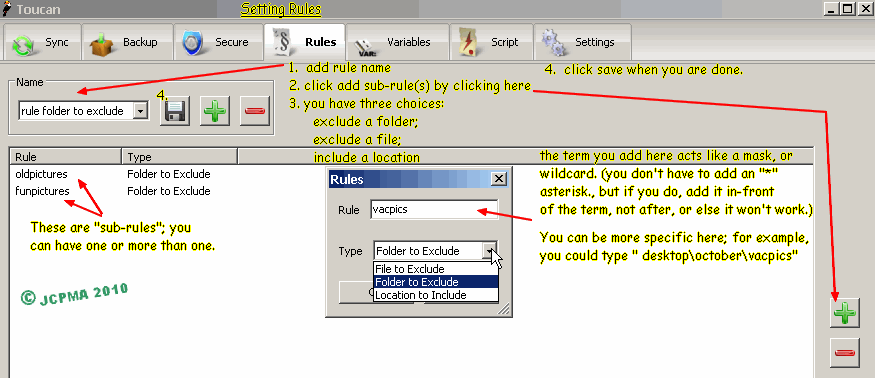
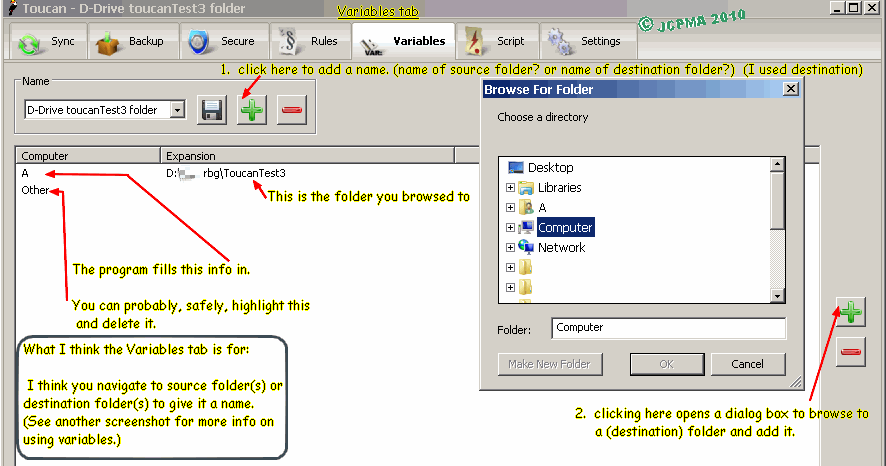
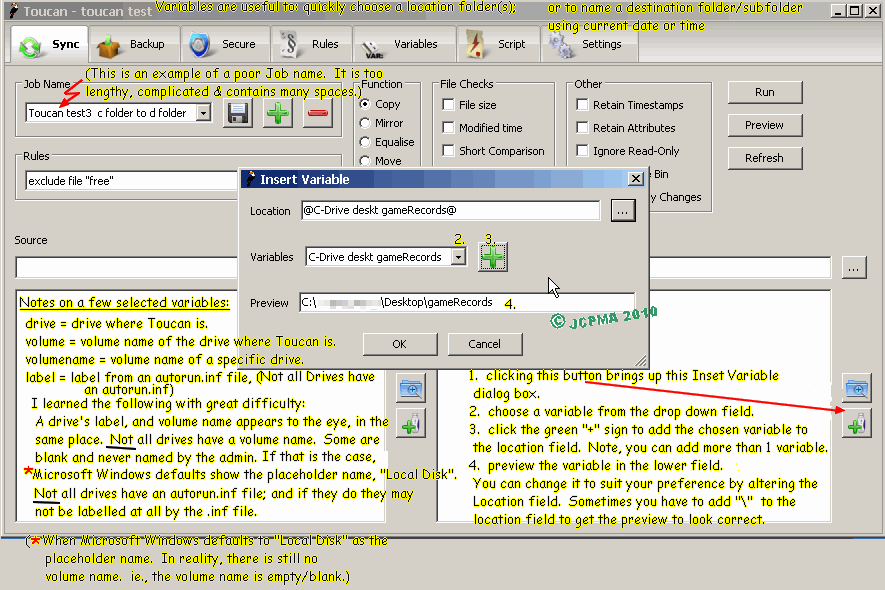
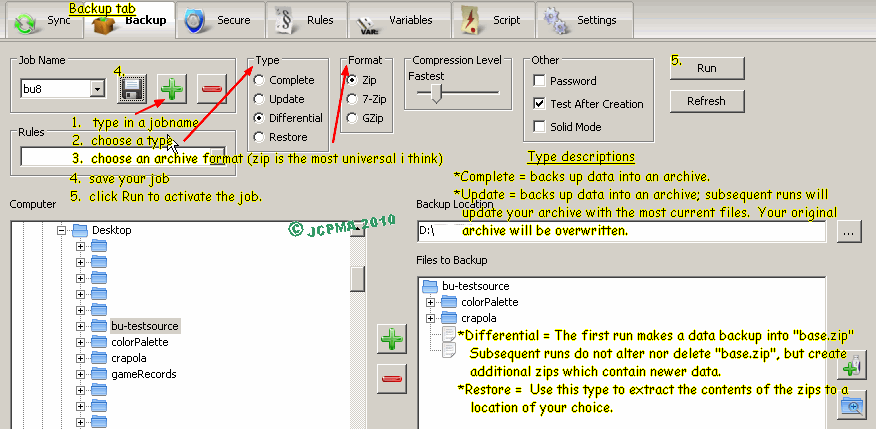
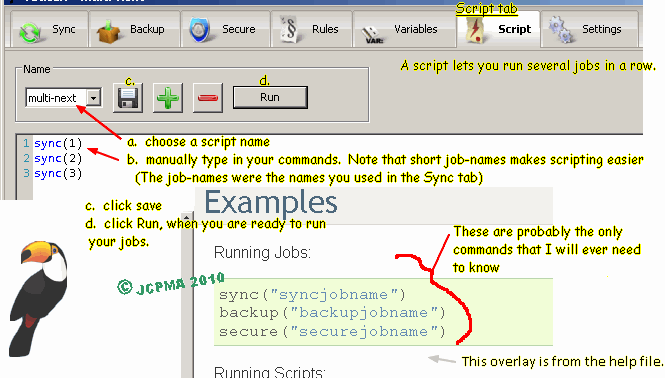
Tutorial Images for Toucan v. 3.0.3 backup and synchronization software.
Here are the lost pictures from the User Guide.


[Late entry: October09-2010: unrelated -- I just spent a fairly long session, editing this blog page and its picture formatting. The images you see on this screen have been cross-referenced to link with Photobucket(R). I chose to do this because, the pictures I uploaded to Blogger won't display any larger when you click on them.]


archive copy of tutorial is at http://www.mediafire.com/?wssog8blp53my

zip archive of pictures http://www.mediafire.com/?lhg0cfp8lml2ali

checksums.md5.txt http://www.mediafire.com/?774midwhp0qfiu7

 
*re-jcpmaone-blogger* *re-jcpma-lv-cm-histats*