Saturday, October 16, 2010

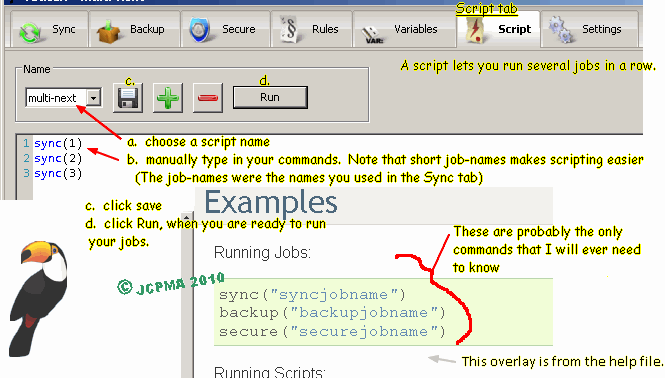
070 - Back4Sure - ScreenShots Tips

Back4Sure - ScreenShots Tips
===
Here are some tips for Back4Sure version 3 backup program for your files.
It is portable and works on Windows.
You can read more about it at www.portablefreeware.com

Unlimited Free Image and File Hosting at MediaFire

Unlimited Free Image and File Hosting at MediaFire

Unlimited Free Image and File Hosting at MediaFire

Here is a copy of the pics as a zip archive http://www.mediafire.com/?c371kleeg469hbf
http://www.mediafire.com/file/c371kleeg469hbf/Back4Sure-TutorialPics.zip

md5 checksums
-------------
1-Back4Sure-tutorialMain.png,dc8fe0f5f51cff2586c9571d2a9d6167
2-Back4Sure-MiddleTabs.png,eeca20639bea29f1f7353fd46322fd43
3-Back4Sure-ActionsTab-other.png,1f12034703a7a442ef7b24f5225b5c7a

069 - Initial Setup for Bluetooth Phone PC Data transfer

Initial Setup for Bluetooth Phone PC Data transfer
===

Background: I have pics etc on my phone that I want to transfer to a PC using the PC's Bluetooth transceiver.[Oct.2010]
This blog post, is written from memory, as I only has a short opportunity to try a Bluetooth enabled computer. It illustrates the steps to expect when PAIRING a DEVICE and the steps to expect when sending a file(s) between PAIRED DEVICES.


My friend's PC has Bluetooth. Having never used Bluetooth before, I went through the required settings in order to transfer a file to the PC, and subsequently, in the reverse direction, a file from the computer to the phone.

I right-mouse-click on a small text file on the PC, and then from the context menu, clicked "SendTo Bluetooth". A Windows® Bluetooth Wizard starts and tells you to proceed. When I continued, Windows immediately indicated Bluetooth was not available. So, after consulting the Windows Help feature, and a long time of trial & error, I remember ending up in the ControlPanel and finally enabling the PC's Bluetooth. ... To make a long story short, the PC needs to be configured to recognize and connect to your cell phone, & similarly, your cell phone needs to be set up to recognize your PC. During this process, Windows self-installs Bluetooth drivers specific to your cell-phone model.

In Jargon, this is called a setting up a "PAIRED DEVICE":

Main steps for the Cell phone:
- Navigate to your phone's Bluetooth section and turn it ON.
- Create your phone's unique (Bluetooth) NAME. (Usually there is a factory preset name, but you can change/tailor it to your own taste)
- Change the phone's Bluetooth visibility setting from Hidden to VISIBLE.
- Go to the phone's PC Data Transfer/Data Sync setting; from here, create your USERNAME, and your PASSWORD

Main steps for the PC:
- ENABLE/activate Bluetooth on PC
- use the Bluetooth Wizard (or ControlPanel?) to SEARCH for active devices (ie search for your Cell phone)
- From the list of Bluetooth devices found, choose and CONNECT to your phone
- enter the (cell phone's ) PASSWORD into the PC
- when prompted by your phone, enter the cell phone's PASSWORD in to your phone.

---note re: PASSWORD. Some phones appear to like numeric passwords over alphabetic character passwords. I don't know why that is.

Results:
---
I sent a small text file,"abc.txt", from the PC to the phone via the context menu "SendTo Bluetooth" selection. If I were prompted, (I likely had to) Accept the connection, once on the PC and once on the phone. Then I had to when prompted, enter the PASSWORD, once on the PC and once on the phone.
I received a note in my phone, (not my text message inbox). The note had no file name, but upon saving it, the phone used the content of the text file as the name of the note. The content/body of the the text file was accurate. [I don't know if this would work for unicode characters. In my test, the test file contained ANSI characters.]

Next, I sent a picture, a .jpg file from the phone to the PC. The phone prompts you to choose from your list of "Paired Devices" for the name of your PC. It asks you to enter the PASSWORD. The PC says a file is being sent (to the PC/itself) and also asks for a PASSWORD. Again, you enter the same one as discussed above. The PC receives the jpg but it stores it in a unique folder, not on the desktop.

Saturday, October 9, 2010

068 - Preferred Way of Dealing with Pictures on Blogger

My preferred way of dealing with pictures on Blogger

I haven't blogged for a while & had forgotten how un-fun (not fun; unenjoyable) it was to add a small/medium sized picture to a Blogger post.

Yesterday, I uploaded some small pics for a tutorial to Blogger. The pics have small print on them.
When I finished the post. I realized that clicking on the pictures would not enlarge them to their normal size nor any larger size. So, today, I had to upload the same pictures to another webservice. (I used Photobucket.com). Next I painstakingly linked the Blogger pics to the new Photobucket links. Coding, even simple html coding, is not that fun. It took some time but I finished it.

Blogger uses its sister-site Picasa.google.com to handle posted pics. You get 3 choices of picture size when you upload; they are small, medium & large. I used "large" in this example, and it wasn't big enough to my liking.

Another reason which frustrated the process, is that adjusting the placement of photos/pics on your post is very non user friendly. The editing "Compose" window is small, and "dragging" your pics, especially large pics to another area on the blog is very difficult, if not impossible. I ended up moving 3-4 pics successfully by dragging; the remaining 2 that I had to move was done by using the "Edit Html" window.

Here's the suggestion of this post.
  • Upload your pics to another web-service if you have more than 2-3 pics.
  • Make sure the web-service has either hot-linking or webpage/blogpage friendly embeddable links
  • The ones I like to use are:
- Photobucket.com
- Tinypic.com
- Mediafire.com
I heard Flickr.com is a good one to use; You need to have/open a Yahoo account to use Flickr.

Friday, October 8, 2010

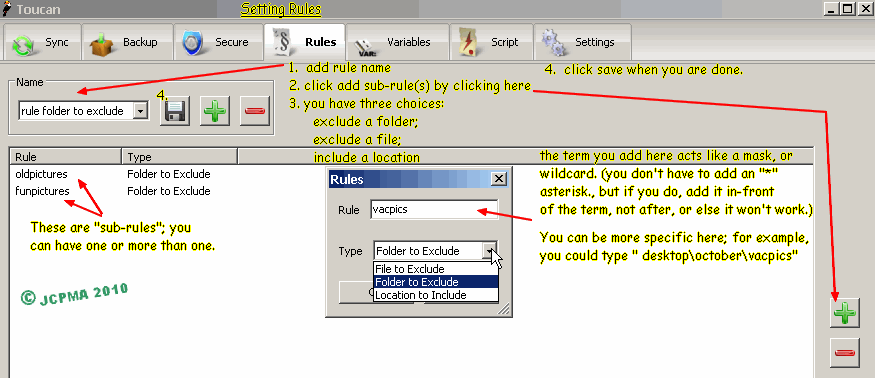
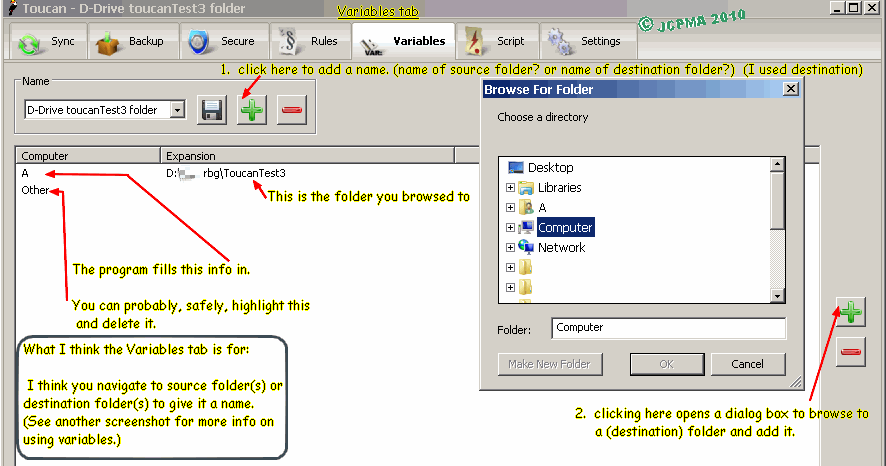
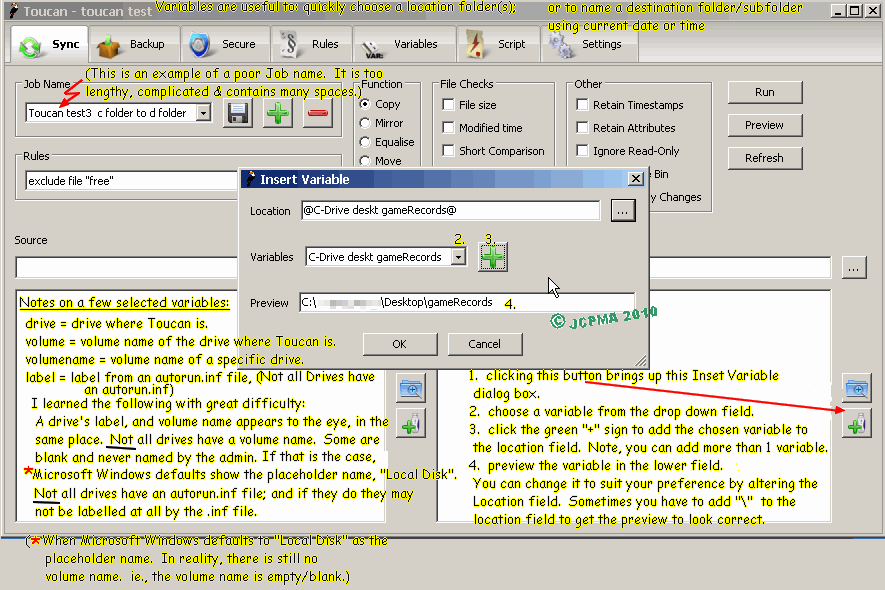
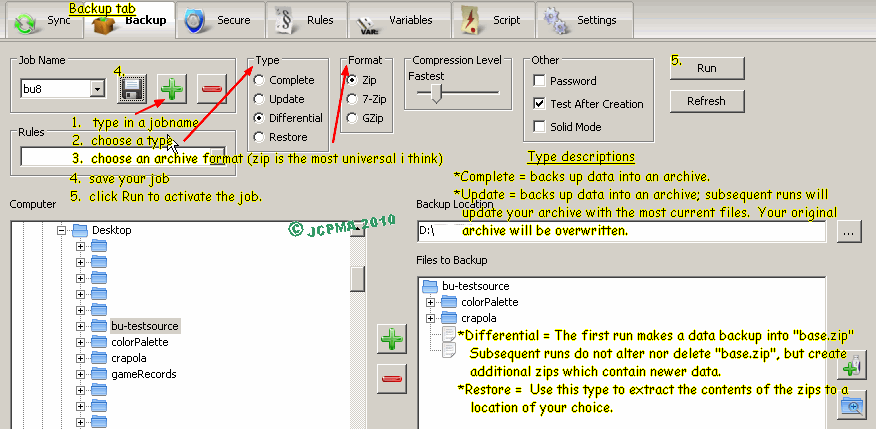
067 - Toucan Backup Tutorial Pictures

Tutorial Images for Toucan v. 3.0.3 backup and synchronization software.
Here are the lost pictures from the User Guide.


[Late entry: October09-2010: unrelated -- I just spent a fairly long session, editing this blog page and its picture formatting. The images you see on this screen have been cross-referenced to link with Photobucket(R). I chose to do this because, the pictures I uploaded to Blogger won't display any larger when you click on them.]


archive copy of tutorial is at http://www.mediafire.com/?wssog8blp53my

zip archive of pictures http://www.mediafire.com/?lhg0cfp8lml2ali

checksums.md5.txt http://www.mediafire.com/?774midwhp0qfiu7

Tuesday, May 25, 2010

066 - Dragon Fruit

066 - Phan Thiet Dragon Fruit 火龍果 火 龍 果

The following is a translation of the plastic packaging of the Dragon Fruit.

巴斯德 生化 研究所 | 巴 斯 德 生 化 研 究 所 Pasteur (Louis) Biochemistry Research Institute
成功分折 報告: | 成 功 分 折 報 告: succeed breakdown listing:
含 豐富 維他命 B1, B2, B12, C 天然 粁維素, | 含 豐 富 維 他 命 B1, B2, B12, C 天 然 粁 維 素,

contains rich plentiful vitamin B1, B2, B12, C natural fibre

葡萄糖 及人體所需礦物質,鐵,錳,鎂,鈷,鈣,磷,鉀 | 葡 萄 糖 及 人 體 所 需 礦 物 質,鐵,錳,鎂,鈷,鈣,磷,鉀

glucose and human body required (dietary) minerals iron, manganese, magnesium,
cobalt, calcium, phosphorous, potassium

065 - CamerayShy test

065 - - steganography series: simple apps to encrypt things from your little brother or sister. CamerayShy test

CameraShy 0.2.23.1

CameraShy0.2.23.1.exe is a Windows based internet browser which encrypts and decrypts hidden text in .gif files.

camerashy-window.jpg (tinypic.com coverts gifs into jpgs), http://i45.tinypic.com/2wrdx8n.jpg
camerashy-window.gif mediafire.com, http://www.mediafire.com/file/xzzyatyjnyz/camerashy-window.gif
Image and video hosting by TinyPic

How to decrypt the two gif files:
three-marked-tabs.gif 6 Kb, md5-hash:d5977bbc65737bc74cf965b80de9aea4
Wikipedia-tab.gif 2 Kb, md5-hash:f552a6c0b9e56f17ccc377f7f29611d1

Step1. open the app, and type "password" into the password field and "[Hacktivismo]" into the signature field.
Step2. If online, select the gif on the webpage on the programs's bottom field.; If offline, select the gif using the upper clockwise direction blue arrow button.
Step3. when successfully decrypted, you can view the text in the upper small window, or by pressing the checkmark button, view the same text in the upper big window.

image links:
three-marked-tabs.gif, Photobucket, http://s556.photobucket.com/albums/ss4/jcpma/20100521stegano/?action=view&current=three-marked-tabs.gif
three-marked-tabs.gif
three-marked-tabs.gif, Box.net, http://www.box.net/steganography/1/43429648/440358266

Wikipedia-tab.gif, Photobucket, http://s556.photobucket.com/albums/ss4/jcpma/20100521stegano/?action=view&current=Wikipedia-tab.gif
Wikipedia-tab.gif
Wikipedia-tab.gif, Box.net, http://www.box.net/steganography/1/43429648/440358232

App. Package:
camerashy.zip, Mediafire, http://www.mediafire.com/file/mm3yizqqd32/camerashy.zip
camerashy.zip, Box.net, http://www.box.net/steganography/1/43429648/440358894

064 - EyeMage test

064 - - steganography series: simple apps to encrypt things from your little brother or sister. EyeMage test

EyeMage IIE version 0901 by Proporta Ltd

Eyemage can encrypt a file or some typed text into a bitmap.
The bitmap can be self-generated noise, or a pre-existing one.

Decrypting an pre-existing illustration bmp with a file hidden in it:
Step1. open EyeMage IIE.exe. click on the (right) `decrypt' button.
Step2. click the "Image" button & load/open the bitmap "eyemage-file-test-2k-content.bmp (49 Kb, md5-hash:2c51515ae01e2fb1cfb930b361645563). This is a picture of a yellow taxi cab.
Step3. click the lower right corner `decrypt' button. Enter "password" as the password.
Step4. A save window should appear, with the name of the hidden file, "eyemage-contents.zip" (2 Kb, md5-hash:ab7d998966de28465dc9331f01071b36). click "save" to complete the process.

Decrypting a self-generated "noisy" bitmap with a file hidden in it:
Step1. open EyeMage IIE.exe. click on the (right) `decrypt' button.
Step2. click the "Image" button & load/open the bitmap "eyemage-file-test-noise-9k-content.bmp (24 Kb, md5-hash:8d51baae375cf68bb91d49146e752786).This is a picture of a rectangle of static.
Step3. click the lower right corner `decrypt' button. Enter "password" as the password.
Step4. A save window should appear, but without any name or extension of the hidden file. also, the location of the save folder may be different. The actual name of the hidden file is: "eyemage-content.zip" (9 Kb, md5-hash:13303674805d3e4a3a0e7d4e1ca1db3e).

Notes:
* One advantage of the noisy bitmap encoding method is that it saves space. i.e., the resultant bitmap is 24 Kb holding 9 Kb of content. Compare this with using a pre-existing bitmap: ie 49 Kb containing 2 Kb of content.
* A disadvantage of the noisy bitmap encoding method is that it may work inconsistently. (ie Failure).
* Another disadvantage, as stated above, of the noisy bitmap method is that the hidden file name is not remembered.
* The minimum length of a password is 4 characters.

Decrypting a hidden text message within a bitmap:
Use the same process of decrypting as above, with these files:
"eyemage-text-test-portrait.bmp" 24 Kb, md5-hash:6de2af2abe79309da789130a4d4ac6a9. An icon sized picture of a portrait.
"eyemage-text-test-noise.bmp 15 Kb, md5-hash:16d8cf4b6bc65566cf4e57b4753822f3. A picture of a smaller block of static.
Both these files contain identical hidden text. On the Eyemage program, it should reveal a few lines of the alphabet & other text from the qwerty keyboard.

Links:
eyemage-file-test-2k-content.bmp Mediafire, http://www.mediafire.com/file/2mzdyrynzig/eyemage-file-test-2k-content.bmp
Unlimited Free Image and File Hosting at MediaFire
eyemage-file-test-2k-content.bmp Box.net, http://www.box.net/steganography/1/43429648/440359038

eyemage-file-test-noise-9k-content.bmp Mediafire, http://www.mediafire.com/file/dnglinz3mjj/eyemage-file-test-noise-9k-content.bmp
Unlimited Free Image and File Hosting at MediaFire
eyemage-file-test-noise-9k-content.bmp Box.net, http://www.box.net/steganography/1/43429648/440359048

eyemage-text-test-portrait.bmp Mediafire, http://www.mediafire.com/file/udyijukgtmz/eyemage-text-test-portrait.bmp
Unlimited Free Image and File Hosting at MediaFire
eyemage-text-test-portrait.bmp Box.net, http://www.box.net/steganography/1/43429648/440359090

eyemage-text-test-noise.bmp Mediafire, http://www.mediafire.com/file/nyehdzhmetj/eyemage-text-test-noise.bmp
Unlimited Free Image and File Hosting at MediaFire
eyemage-text-test-noise.bmp Box.net, http://www.box.net/steganography/1/43429648/440359064

App.Package:
eyemage.zip, Box.net, http://www.box.net/steganography/1/43429648/440359016
eyemage.zip, Mediafire, http://www.mediafire.com/file/mjqmdujdmgi/eyemage.zip
 
*re-jcpmaone-blogger* *re-jcpma-lv-cm-histats*