Showing posts with label portable. Show all posts

Saturday, October 16, 2010

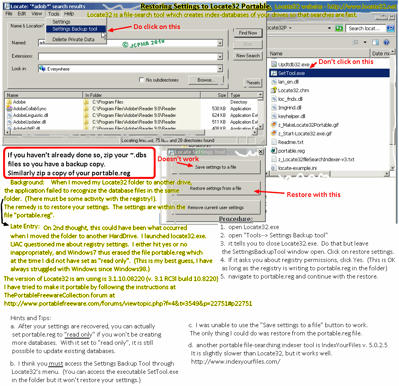
073 - How to Restore your Portable Settings on Locate32

How to Restore your Portable Settings on Locate32 version 3.1
=======

Locate32 is a file-search tool for Windows which creates indexes for fast searching.
More info is available at www.portablefreeware.com on Locate32.


Unlimited Free Image and File Hosting at MediaFire

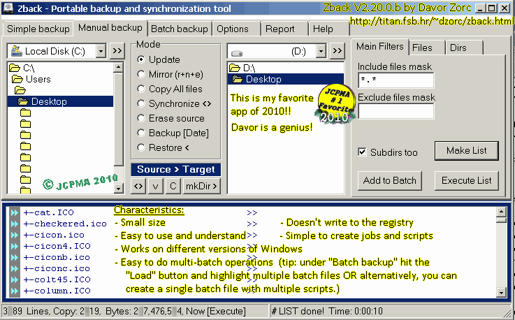
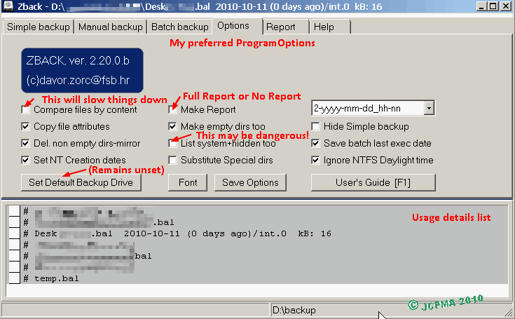
072 - Zback v. 2.20.b Review and Tips

Zback v. 2.20.b Review and Tips
===
This is a wonderful backup & synchronization tool for Windows PCs.

Unlimited Free Image and File Hosting at MediaFire

Unlimited Free Image and File Hosting at MediaFire

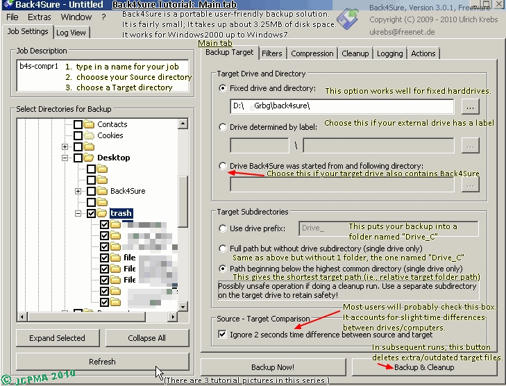
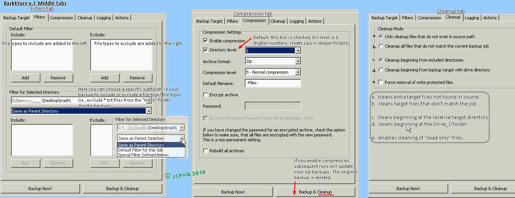
070 - Back4Sure - ScreenShots Tips

Back4Sure - ScreenShots Tips
===
Here are some tips for Back4Sure version 3 backup program for your files.
It is portable and works on Windows.
You can read more about it at www.portablefreeware.com

Unlimited Free Image and File Hosting at MediaFire

Unlimited Free Image and File Hosting at MediaFire

Unlimited Free Image and File Hosting at MediaFire

Here is a copy of the pics as a zip archive http://www.mediafire.com/?c371kleeg469hbf
http://www.mediafire.com/file/c371kleeg469hbf/Back4Sure-TutorialPics.zip

md5 checksums
-------------
1-Back4Sure-tutorialMain.png,dc8fe0f5f51cff2586c9571d2a9d6167
2-Back4Sure-MiddleTabs.png,eeca20639bea29f1f7353fd46322fd43
3-Back4Sure-ActionsTab-other.png,1f12034703a7a442ef7b24f5225b5c7a

Friday, October 8, 2010

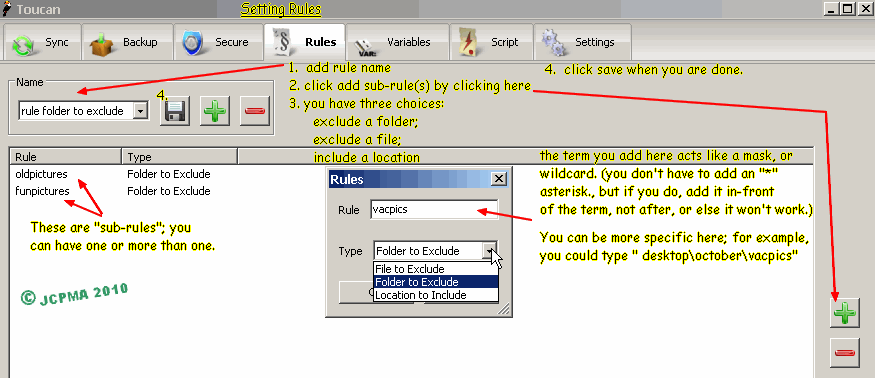
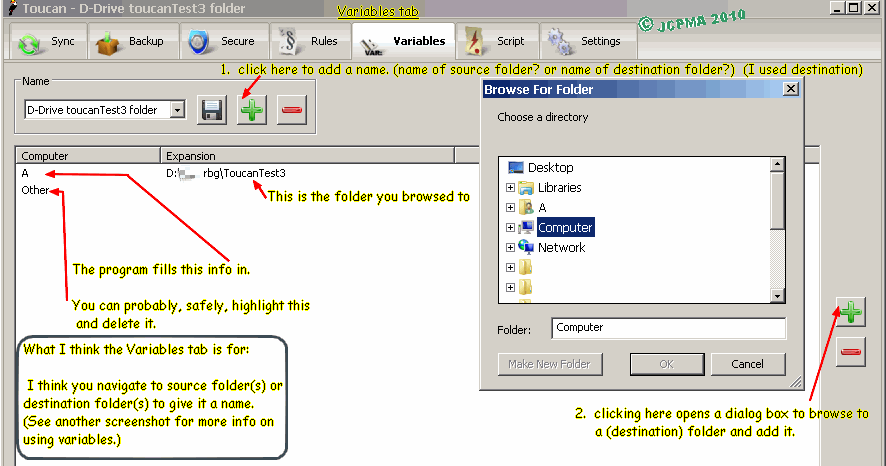
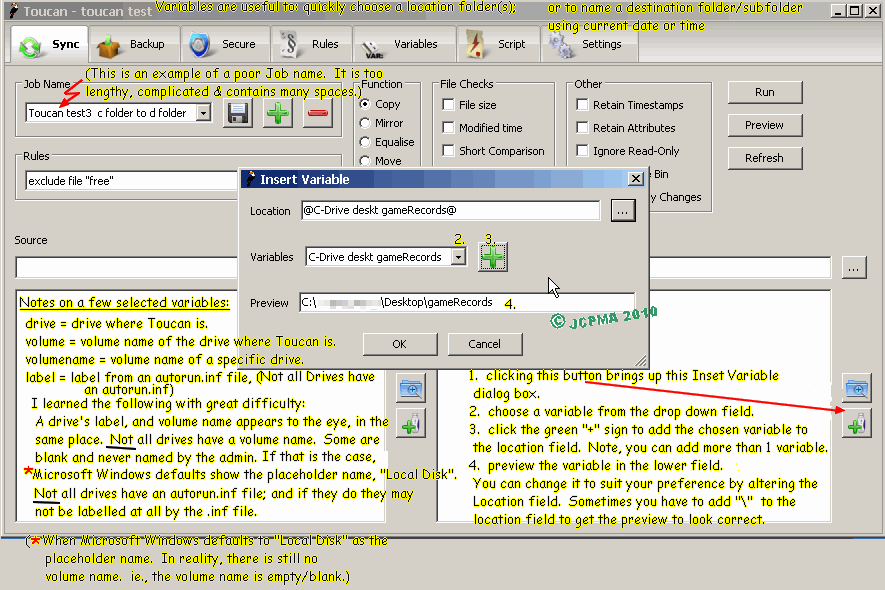
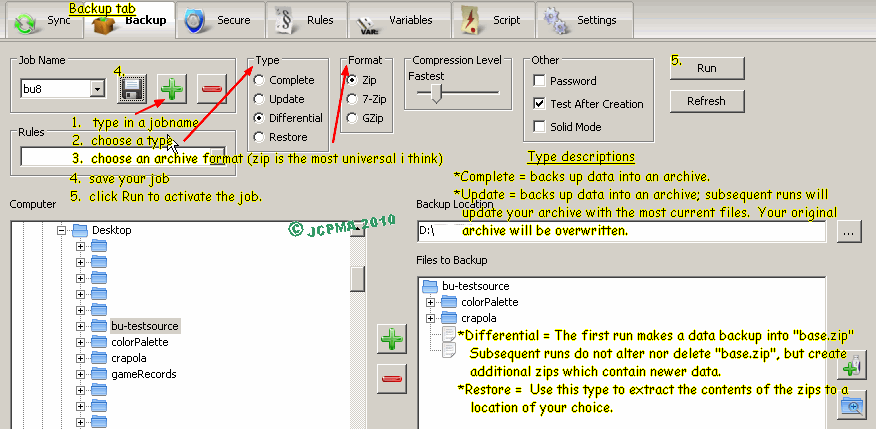
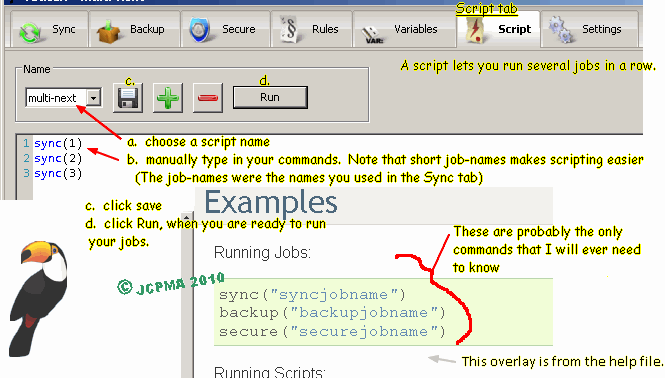
067 - Toucan Backup Tutorial Pictures

Tutorial Images for Toucan v. 3.0.3 backup and synchronization software.
Here are the lost pictures from the User Guide.


[Late entry: October09-2010: unrelated -- I just spent a fairly long session, editing this blog page and its picture formatting. The images you see on this screen have been cross-referenced to link with Photobucket(R). I chose to do this because, the pictures I uploaded to Blogger won't display any larger when you click on them.]


archive copy of tutorial is at http://www.mediafire.com/?wssog8blp53my

zip archive of pictures http://www.mediafire.com/?lhg0cfp8lml2ali

checksums.md5.txt http://www.mediafire.com/?774midwhp0qfiu7

Sunday, March 8, 2009

017 - energizer duo charger

energizer duo charger

model CHUSB

purchased 2009

UsbCharger_setup_V1_1_1.exe = installer software for windows
software that lets you monitor charging progress from your
computer screen (this software is NOT portable)

Energizer_Charger_DriverAndTools(ppc_intel).sit = installer software
for the mac computer (same idea as above)

CHUSB_E_F_S.pdf = owners manual


nickel review:
*this charger is for NiMH batteries only.
*you can charge 1 or 2 batteries, either 1 AA or 2 AA cells,
or similarly, 1 AAA or 2 AAA cells.
*sometimes when charging 2 batteries, the green led flashes rapidly indicating
a bad battery. The way to get around this is either:
- remove the batteries and reinsert OR
- remove a battery and charge only 1 battery at a time in slot 1.
*this charger is small and allows charging by AC or usb port.

* i give this product a rating of 6 out of 10.
-it is handy & is of good value
-software needs to be installed and is not portable
-charging 2 cells sometimes results in a charging error

Sunday, March 1, 2009

015 - notes on a few rss services

notes on a few rss services

bloglines.com nice and simple; allows creating anonymous email mailboxes; saved searches
{{30d14135671890c266ced1edb44844c0aca8d4e21c22b7754aa76aa2de9e3b0
d66bafa4ac1ab2c4f3c297f91c1fd633c160d3a968bba1847d2a44a7bc8ba24601
29646af8a709aecb33f3bea9142555448e48edd73e81947b93e4e295e5e2cb84
294967292}}jj@s
my.yahoo.com userfriendly

alerts.yahoo.com alerts of feeds can be sent to email or messenger or mobile

newsgator.com 3 saved searches = aka "smart feeds"; podcatching; fwd feeds to email or mobile is possible (but labor intensive; ie, need to setup individually for each feed)
{{b5e44419043f4032a8d051c90ef246916abe335a3f6e1dbb0b6188618d03b
9381640a3d076d5af5107ec0130bf39afe68738c1b437ef246deb0cb69066fa0
bc3fbd02a9d575da4443234086674cbddb4643d5e292da1a6f8a61d7792c410
bcb74294967292}}jo

netvibes.com customizable main page; "add to clippings" feature.
{{572ea7c90167cf606622acd2a80399e919b7745b31363630bffa9fe93dc069
4d2789fe113a791d1db63c839a070899c35a3c6c71acd237adef77ff970050ef5
24294967293}}jj@s

a couple of portable downloaded software rss reader clients are:

nf reader 1.37 .easy to use; small footprint
(you can add your own .wav file to its main folder to customize the notification sound.)
Author website http://www.gaijin.at/
Download http://www.gaijin.at/getit.php?id=nfreader

abilon 2.53 portable rss reader .easy to use; small footprint
"rssitem.templ" in "Themes" folder and add "<>" at the bottom of this file. This should show links to enclosures at the end of the feed.

Author website http://abilon.org ... broken link?
Download at softpedia.com http://download.softpedia.com/dl/47aaa6d15227e8b8642f2584bbb54203/499c9e21/100079400/software/portable/internet/news/PortableAbilon.exe


feeds
{{40caf5b9e525b1bd72abb387d6b34088a5e7325e97dd64f6548dd22c269c
6954e55462ad54143ba80b100ba723da6691335acee7e9c1535b235605a5e
6e98aa3159f9fc7d929425ec8bd7c081f4aa2dc7c8ff80aaa9c686e6ad90f509
0a794f1bf4c8475dd6a880cbe2f4215069e58e8ac1b5e8fc93bbb4f7e9464b8
aa7e5e42d05808cccaaec4f74001b36eb4869e1ec5bd10017f1ff905bc3a6ed
fc43e1a834b7352b9748bd1c6bc63e201a663f858458d5815c731938c043df
f4cc93802c6a1382f57108bfde269a42048cf8aa14fcd57f17ef8e68d80f4ae2
83a70c9dab757214b5344038a86db2d60550e7e8615b45bb01353d45de0
efd6a2b531d833b355a29a960aae7ec86ebbc94f2dc653dcb3127927bce86d
bd6f1975b3a0abdf31e882783495592dfc041d8dba6ee706fb3695e756851f
392b4ee377b8830013dd5b62acdf1c20f90de68f1c6ee6fc4a20901b5ed11a
638163d247de4726fe2aecf0953a43183f682aecc1aaee5bd96e0f1f32ecac9
e094108982ff3461619c8902442e71578e931273978645e46a076880f4528
423f4fb283abdcb054755885f8f869b1d922cb3d88a650c27514f6582455c
4e7844193a329b4d319c19214472b4294967281}}

Saturday, February 21, 2009

013 - untried portable vista tweakers

These portable vista tweakers have not been tried by me.

http://www.ajuaonline.com/software/vistatweaker/ is the home of version 0.5 Beta Released on: 2007-10-25 portable vista tweaker
It looks promising; it appears to use microsoft.net?? (obviously it is not for use on windows xp).


Vispa is another popular Vista tweaker. http://vispa.whyeye.org/
It is from the same maker as xpy (see also http://jcpma.blogspot.com/2009/01/010.html)
McAfee antivirus says it is an "unwanted program"?? (see below)

It is probably a very good program though.

Sunday, February 8, 2009

011 - I tried Ultimate Windows Tweaker 1.0 Beta

I tried ultimate windows tweaker 1.0 Beta from WinVistaClub

Feb06-2009
As you can see Ultimate Windows Tweaker (UWT) will not work on Windows XP. It is made for Windows Vista.

The interface is simple. It has a similar feel to Power Toys' TweakUI for Windows 98 or TweakUI for Windows XP. Each category of tweaks is selected via the left hand
panel; there are 8 categories. (I include the "about" section as a category as it appears there are a few tweaks available in that pane.) Hovering the mouse-pointer over a checkbox results in balloon tips explaining the tweak. You either check the desired box or move a horizontal slider. It does not take long to enhance Windows Vista this way. It however took me more time to read about the changes and to decide if I wanted to apply them.
With my limited knowledge of computers and Vista especially, I still proudly was able to improve the OS to my preferences. I only changed the settings, using UWT, which I understood. If the explanation of the tweak was still foreign to me, I just ignored it. That probably is a good general rule to follow.

My mission was to make Vista less "pretty" & to free up some computing power/ resources that most-likely were being eaten up by services/features that were not needed nor necessary. The enhancements I undertook included some of the following:
Launch folder Windows in separate processes (Thus if 1 folder crashes, the others should remain ok)
Menu show speed
Taskbar settings
Internet explorer
Turning off the Aero appearance
Adjusting shutoff wait times dealing with apps/non-responding apps/services
Unload DLLs from memory
Turning off un-used services (eg.s):
Disable file indexing service
Disable Automatic Folder View discovery
Readyboost
Superfetch
Error reporting
... others etc. ...
Disable automatic restart after Windows Updating
Tab Browsing


It worked like a charm.

Pros:
It is a small, portable app (384 KB). It does not require installation.
(lower left) there is a button to create a System Restore Point before you begin tweaking. This is quite thoughtful!
Intuitive user-interface
Balloon tips explain the tweak.

Cons:
You must hit the "apply" button for each category. if you navigate to another category before doing so, you will lose all your choices for that pane.
The descriptions are short. not all tweaks are explained adequately for average "dummies" (like us).


download link for Ultimate Windows Tweaker:
http://www.winvistaclub.com/download/Ultimate%20Windows%20Tweaker.zip
Saturday, January 24, 2009

010 - some windows xp tweakers

some windows xp tweakers (most here don't require installation)
These allow you to tweak the operating system, or certain registry settings, or some security vulnerabilities.

Startup Control Panel 2.8 by Mike Lin: very very nice.


seconfig XP 1.1 - easy: (2007) secures some common threats to a windows xp machine & some ports too. very user friendly.


safe XP 1.57 - medium: a tweaker with a medium friendly interface; still, .. it is quite easy to use. This version is a little dated (July 2005) but I still recommend it. On its status bar, beside the pics of the international flags, is the area which holds the description of the tweaks if you hover your pointer over the item.


tweak ui 2.1 for XP - easy: This app is from Power Toys. It is elegant & excellent. most items are explained.


xp antispy 3.97 - medium: good explanations; colors of checkboxes can be confusing though. I think the green means profile choices, the check mark means what will be applied when you click the button; I think red means it does not match the profile. (other colors exist too.)


xpconfig 1.1 - medium: (May2008) This may appeal to some people. There is lack of description or help files/documentation, although the ui looks promising. (I haven't used it.)


xpy 0.10.9 - easy: This one is elegant too! On first run it saves an undo point. The colored check boxes indicate whether the parameter is already activated. the explanations are ok. i think green means the tweak WILL be added and red means the tweak is already in place. A white checkbox is neutral.

009 - small review of portable antivirus

small review of portable antivirus

http://grandstreamdreams.blogspot.com/2008/11/portable-anti-virusmalware-security.html

I reviewed some of the portable antivirus apps at the above site.

Trend Micro's Sysclean: easy to use & straight forward ui

Panda Command Line Scanner UI: not reviewed. requires WindowsXP &/or Microsoft .NET installed first. (it looks promising though)

Kaspersky Virus Removal Tool: not reviewed. requires WindowsXP &/or Microsoft .NET installed first. (It sounds like Kaspersky is popular amongst users.)

McAfee Command-Line Virus Scanner: This is a fast program. It works very well.

a-squared Emergency USB Stick: Pros: nice ui. simple/intuitive. works on older Windows 98 PC's with adequate RAM. looks for some spyware too. Cons: It sets itself up as a service & this can cause Windows XP to "hang" on shutdown. (to disable this go to RUN-> MSCONFIG or
RUN-> SERVICES.MSC and uncheck the appropriate box).

Clam-Win Portable: simple to use. slower than the McAfee scanner though.

Malbytes Rogue Remover Free: not reviewed. requires WindowsXP &/or Microsoft .NET installed first.

Ikarus T3 CLI scanner: works ok. It seems thorough. no gui though.

Multi Virus Cleaner 2008: for certain viruses only. This works on Windows 98 and has a nice user interface.
 
*re-jcpmaone-blogger* *re-jcpma-lv-cm-histats*