Showing posts with label portable apps. Show all posts

Tuesday, December 20, 2011

111 - Crypton tutorial

111 - Encryption series: simple apps to encrypt things from your little brother or sister. Tutorial of:
Crypton 1.2
==== tutorial written by JCPMA © Nov.07.2011

SUMMARY
•Crypton requires no installation & is usb-drive portable.
•is small (only 30 KB)

What you can do with Crypton:
* Sign files (to vouch for/ prove their integrity).
* Verify signed files.
* Calculate files' checksums (MD2, MD4, MD5, and SHA1 hashes).
* Wipe/Shred files.
* Encrypt files for yourself.
* Encrypt files for others (you need their public key first though).

Crypton v 1.2 created by Damian Bakowski is a brilliant small app, for Windows, that incorporates a Public key exchange. Where PGP and GnuPG are mainly concerned with email, Crypton is mainly focused on encryption of a FILE and signing of a FILE. It has no compatibility with PGP-type programs, but it shares similar theories in encryption.

I downloaded this app in the Spring of 2006. Obviously there was an English users manual which I have since lost, but I have partially retained some of its information through a .txt copy.(see links below). Like most, I find the whole process of Private and Public key-pairs, PGP keys, GPG keys etc... intimidating and complex. After reviewing the little information I had with Crypton, my first instinct was to delete it. But I reconsidered and am promoting it here because...
It does a great job of encryption but it has even greater value as a SIGNING application! With Crypton, you can sign files (whether they be encrypted or not) before you post/send them via the internet/other. Others will then use Crypton, a small 30 KB app, to verify the files you signed.
PGP (& so far with GnuPG) require their program to be installed on a computer for the ability to sign and verify files. If you do not mind installing programs you should choose either PGP or GPG(GnuPG). It is a good type of software to have. GPG4usbPortable-version0.3 is about 11 MB in size, but have not yet finished their development of signing emails or files. Thunderbird2Portable-with-GPG1.4-with-Enigmail0.95 is a 36 MB package that is portable. It can sign emails/email attachments, but cannot sign files or verify other signed files. Perhaps a more recent version will be capable.
What is wrong with using checksums like MD5 or CRC to verify files? Nothing! I use checksums for 99% of my needs and it works perfectly. However, signing a file adds a personal touch, in that, you are personally vouching for a file's integrity. If you want to be a geek, you have to go that extra step.


crypton-ss_3.png http://www.mediafire.com/download.php?38x8wcj64y3s44f
http://www.box.com/s/85770lidq58esb6bb30k

The original website was here: http://www.d--b.webpark.pl/crypton_en.htm
Crypton is still available for download from other internet sites but I uploaded my own copy with some keys here:

Box.net FileShareFolder \crypton\ http://www.box.com/s/plgvnuncu3k65duxm7ux

crypton12jc-pkg.MD5.txt http://www.box.com/s/ixyr2rv5vdep76ksp5lv
crypton-ss_3.png http://www.box.com/s/85770lidq58esb6bb30k
howtoUse-Crypton3.ans.odt http://www.box.com/s/rrlryrx1mjgh2cmx78u6
howtoUse-Crypton3.ans.pdf http://www.box.com/s/azyqr81yevnazfpkvlmt
howtoUse-Crypton3.ans.txt http://www.box.com/s/3mo3qbfy3gexfamltc47
crypton12jc.sgn http://www.box.com/s/2idn116b73n7cff75via

crypton12jc.zip <== this is the software
http://www.box.com/s/btgx3fjhako1kqrcqqeo

Mediafire FileShareFolder \crypton\ http://www.mediafire.com/?pa1wjewwt79sb

crypton12jc-pkg.MD5.txt http://www.mediafire.com/download.php?z4dpmwjh1dfoj92
crypton12jc.sgn http://www.mediafire.com/download.php?pvvsrbcobortl7e
crypton12jc.zip http://www.mediafire.com/download.php?dj4e34j39ccwwme
crypton-ss_3.png http://www.mediafire.com/download.php?38x8wcj64y3s44f
howtoUse-Crypton3.ans.pdf http://www.mediafire.com/download.php?tx35x6wm5i9xtda
jcpma2011-public-crypton-key_242A.pbl http://www.mediafire.com/download.php?53983hy5oi7sd4x

The Copyright © holders have all rights reserved. The software and web documents are provided "as is" without express or implied warranty of any kind by the parties and contributors involved.

±±±± pre-amble of Public Key Exchange encryption
A casual/vague synonym for Public key exchange may be "Diffie-Hellman exchange" named after the duo who invented this type passkey encryption. They could be considered the grandparents of Public Key Exchange encryption. RSA, Elgamal, & DSA are some of the variations of this type of encryption†.
I'm most comfortable with traditional passkey use, the kind that does not involve a Public key exchange. Examples are many: webmail login; using a bank card at an ATM or retail shoppe; logging on to a computer; logging in to a blog account to post a blog entry; etc... This is much SIMPLER, but LESS SECURE. If someone guessed or found your password it would be easy for them to pretend to be you. Non-crucial information can be encrypted by any of the vast number of available encryption apps to prevent it from being viewed by nosy neighbors. It's fast and easy and most of the time it is adequate. However for sensitive data, Public key exchange types of software should be considered for encryption.

I was introduced to Public key exchanges when PGP, and GnuPG started to become popular. These programs secure email's text and email's file sending. (PGP doesn't really stand for Pretty Gconfusing Privacy, nor does GnuPG stand for Gnu Privacy Gconfusion.) It was a steep learning curve for me to just get a grasp of the basic/minimal concepts before I even touched any of the software.
This type of key use enables:
1. encryption targeted for a specific receiver.
2. a working hybrid key that is difficult to crack.

Public key exchange based programs like PGP, and GnuPG have a built in Key Manager. The key manager performs two crucial functions:
i.) It creates unique pairs of private-public keys.
ii.) It creates hybrids between your own private key and an external third-party public key (OR in some cases hybrids between the program's temporary key, your private key and an external third-party public key).

If anyone gets a hold of two public keys, it would be extremely difficult, if not impossible, for them to figure out the hybrid key. (If they were to get a hold of a private key,... well that's "a different story!").

(†)"Introduction to Cryptography" (Copyright 1999, Network Associates, Inc., Santa Clara, CA 95054 http://www.nai.com)
end of pre-amble ±±±±

Saturday, October 16, 2010

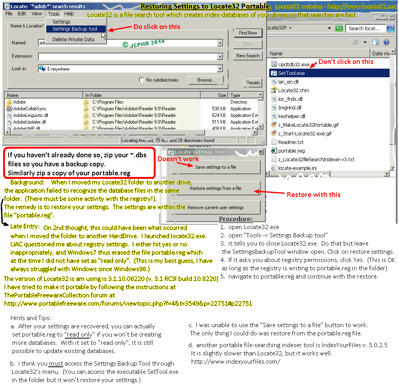
073 - How to Restore your Portable Settings on Locate32

How to Restore your Portable Settings on Locate32 version 3.1
=======

Locate32 is a file-search tool for Windows which creates indexes for fast searching.
More info is available at www.portablefreeware.com on Locate32.


Unlimited Free Image and File Hosting at MediaFire

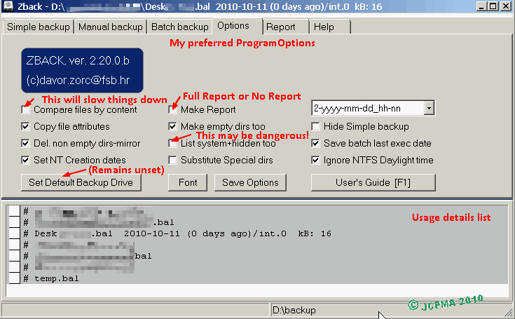
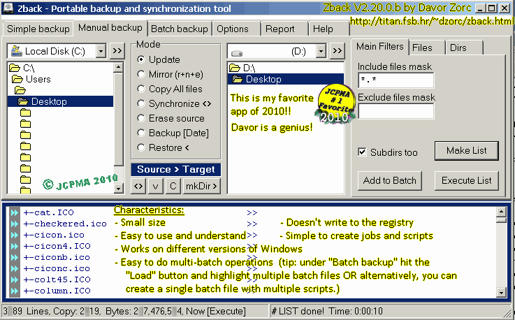
072 - Zback v. 2.20.b Review and Tips

Zback v. 2.20.b Review and Tips
===
This is a wonderful backup & synchronization tool for Windows PCs.

Unlimited Free Image and File Hosting at MediaFire

Unlimited Free Image and File Hosting at MediaFire

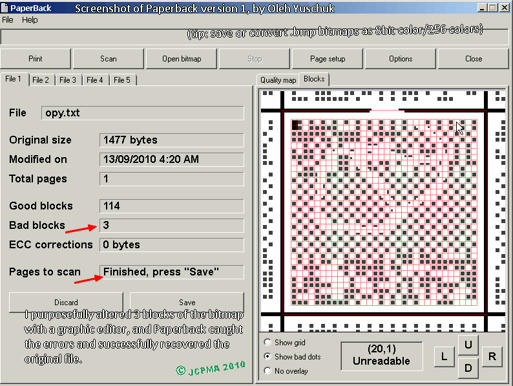
071 - PaperBack v.1.0 review

PaperBack v.1.0 review by JCP
===============
.What - back up (small) files to printed paper; OR a bmp steganography app.
.who - Oleh Yuschuk
.where - http://www.ollydbg.de/Paperbak/index.html
.when - today is Sept29-2010
.why - It is a neat concept.
.how -

PROS
- small 227KB; - Portable!; - v.innovative! -password encryption available!

CONS
- not practical for large size files:
(132kb jpg file : 3/4 page : 14.5mb bitmap);
(3 bytes txt file : 1/8 page : 2.2mb bitmap)
[ (3 bytes txt file : 1/8 page : 1.12mb bitmap) <== at extreme settings.] - need a nice printer and scanner - version 1. backs up 1 file at a time.

Unlimited Free Image and File Hosting at MediaFire


myNotes
~~~~~~~
IdealEquipment = 600dpi LaserPrinter; Scanner with 900dpi+ real resolution.
Inkjet printer limitation = maximal useful resolution 200dpi

You can save a file to a bmp by using "save to bmp" in the file menu.
Drag and drop is supported. But dropping a bmp will activate recognition/recovery.

Do not convert resultant bmps to other than 8bit-color, or recovery will be impossible.

Much thought went into coding this app. For example, Encryption algorithm,
drag&drop feature, Redundancy for correcting errors; Paper formatting; Data compression


Options:
~~~~~~~
Printing Options are:
Dot Density: use (120 or) 150 dpi. You store more data on a sheet of paper
with a higher dpi, but at the expense of requiring a nicer printer, and also a nicer
scanner for recovery of data. At 150 dpi setting, the programs suggests for recovery,
that you scan at a physical resolution of 450 dpi. Also, a higher dot density means a
smaller bmp file.
Dot size: author suggests 70%. The reason is that some white space around
the dot will help scanner recognition/dot distinction.
Compression: author suggests Maximal, unless you have a slow computer.
Redundancy: 1:5 means app's recovery algorithm allows 1 data-block to be
recovered, rebuilt in case of error for every 5 data=-blocks which are printed.
A smaller ratio, ie 1:10 would mean your resultant bmp or # of sheets to be printed
would be smaller. A higher ratio, ie 1:2 would mean your data is more safe. (For
my tests, i used 1:7)
Header and Footer: This option allows descriptive info for human eyes.
Border Around The Page: This should be checked; This improves autocropping
by twain drivers.

Decoding Options are:
Autosave complete files: when scanning multipage files, Paperback recognizes
the completion of scanning and prompts you to save your file.
Determine Best Quality: slows down recovery, but the app works better to
analyze and repair data.

Encryption Options are:
Encrypt data: This activates encrypting the backup.
Password in open text: whether or not pw is shown as you type it

MyResults (with MD5 checksums)
~~~~~~~~~
jpg0 = original file to be backed up. It is a 132 KB jpg image.

jpg0.jpg 132 KB (136,165 bytes) 4d8c2b60bdc77345b801b57a0573943c
jpg1.jpg 132 KB (136,165 bytes) 4d8c2b60bdc77345b801b57a0573943c
jpg2.jpg 132 KB (136,165 bytes) 4d8c2b60bdc77345b801b57a0573943c
jpg3.jpg 132 KB (136,165 bytes) 4d8c2b60bdc77345b801b57a0573943c

bmp1.bmp 14.5 MB (15,218,038 bytes) 8bit color baf58cb7192043ce31d9c8f58a3b98b5
bmp1.bmp.zip 449 KB
bmp1.bmp.jpg 8.88 MB (9,312,597 bytes) 8bit color
bmp1.bmp.jpg.zip 715 KB
bmp1.bmp.jpg.gif 3.39 MB (3,562,963 bytes) 8bit color
bmp1.bmp.jpg.gif.zip 3.39 MB
bmp2.bmp 14.5 MB (15,218,038 bytes) 8bit color b3373776f8c93f3515fb1cbbd7c30a15

bmp3.bmp 14.5 MB (15,218,038 bytes) 8bit color 8ca1d7f0431db0ff853f414e78151c8e

backup jpg0 file took 1 sheet of paper and filled up 3/4 of a page with dots.
backup jpg0 file with encryption took 1 sheet of paper and filled up 3/4 of a page with dots.


Explanation of results:
~~~~~~~~~~~~~~~~~~~~~~
My Printing Options used for the test:
DotDensity - 150dpi;
DotSize - 70%;
Compression - Maximal;
Redundancy - 1:7
Header & Footer - Yes;
Border Around the Page - Yes

Backing up the 132KB original file by saving to bmp resulted in a bmp file ("bmp1")
14.5MB with dimensions of 4192x3630 pixels at 8bit-color depth.
Next, I converted bmp1 to bmp1.jpg 8.9 MB, and then this I converted this to
bmp1.jpg.gif 3.4 MB. (Interestingly, zipping bmp1 gives you a zip file 449 kB). I
converted bmp1.jpg.gif to bmp2 and proceeded to recover the file. It worked perfectly.
The resultant jpg file, jpg2.jpg is identical to jpg0.jpg

Backing up jpg0.jpg using encryption to bmp3.bmp gave a bmp with identical size and
dimensions as bmp1.bmp, 4192x3630 pixels at 8bit-color depth. The MD5 hash was different
and visual inspection of the bmp image showed the dots were placed differently. Recovery
of this backup was successful: jpg3.jpg is identical to jpg0.jpg.

070 - Back4Sure - ScreenShots Tips

Back4Sure - ScreenShots Tips
===
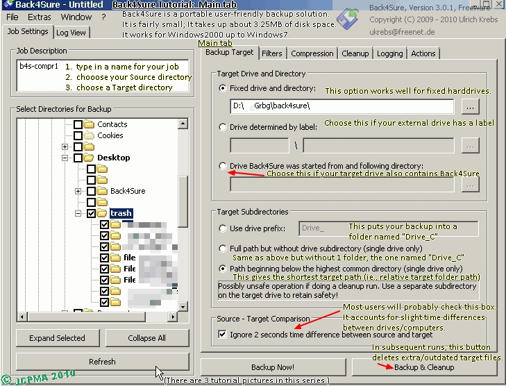
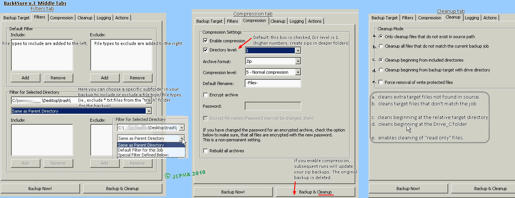
Here are some tips for Back4Sure version 3 backup program for your files.
It is portable and works on Windows.
You can read more about it at www.portablefreeware.com

Unlimited Free Image and File Hosting at MediaFire

Unlimited Free Image and File Hosting at MediaFire

Unlimited Free Image and File Hosting at MediaFire

Here is a copy of the pics as a zip archive http://www.mediafire.com/?c371kleeg469hbf
http://www.mediafire.com/file/c371kleeg469hbf/Back4Sure-TutorialPics.zip

md5 checksums
-------------
1-Back4Sure-tutorialMain.png,dc8fe0f5f51cff2586c9571d2a9d6167
2-Back4Sure-MiddleTabs.png,eeca20639bea29f1f7353fd46322fd43
3-Back4Sure-ActionsTab-other.png,1f12034703a7a442ef7b24f5225b5c7a

Friday, October 8, 2010

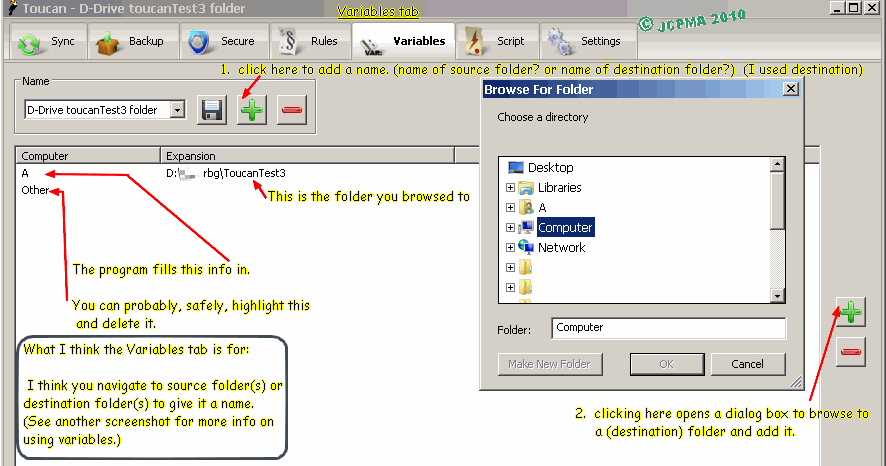
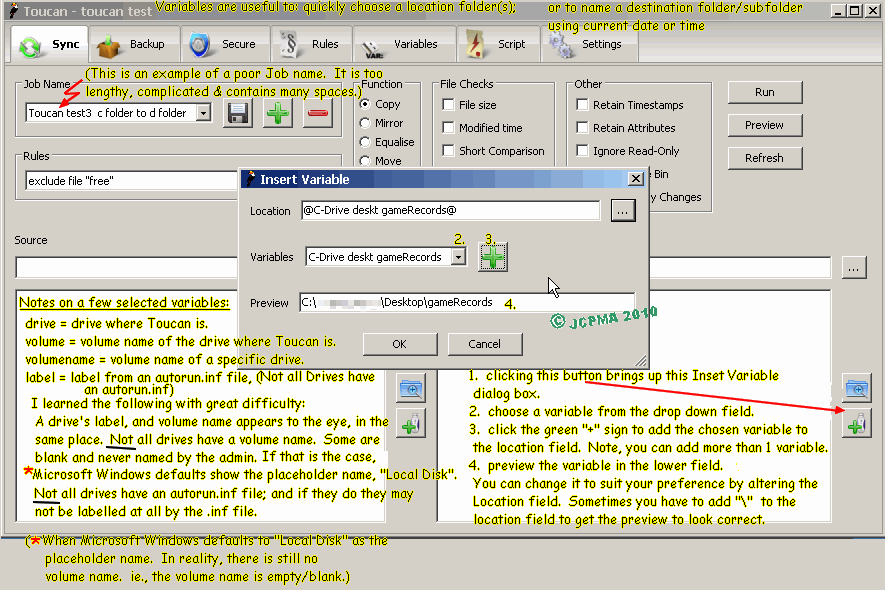
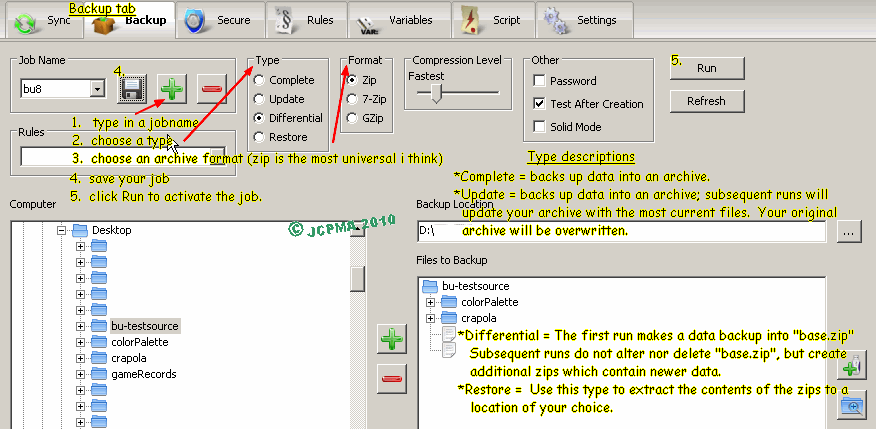
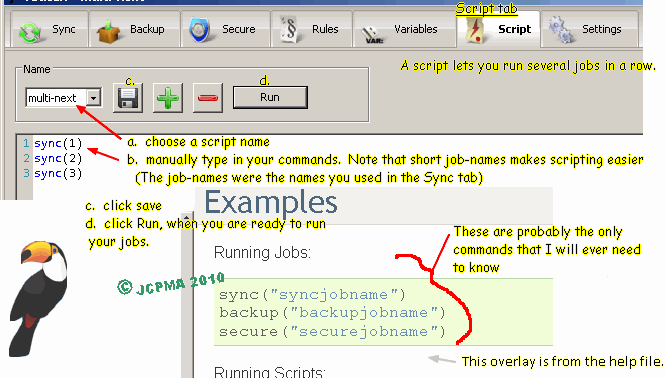
067 - Toucan Backup Tutorial Pictures

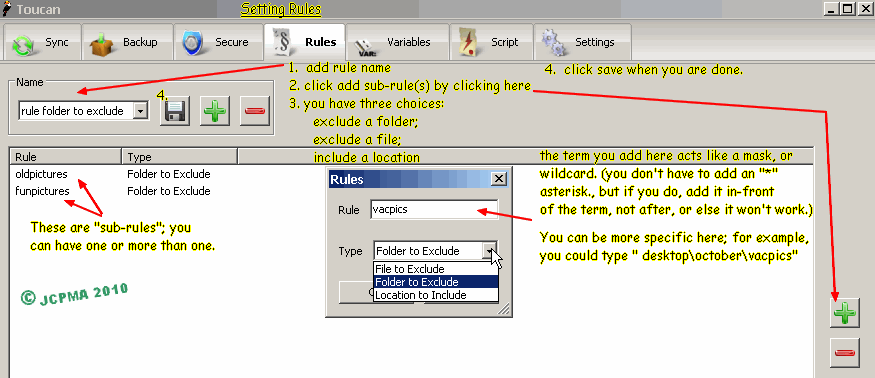
Tutorial Images for Toucan v. 3.0.3 backup and synchronization software.
Here are the lost pictures from the User Guide.


[Late entry: October09-2010: unrelated -- I just spent a fairly long session, editing this blog page and its picture formatting. The images you see on this screen have been cross-referenced to link with Photobucket(R). I chose to do this because, the pictures I uploaded to Blogger won't display any larger when you click on them.]


archive copy of tutorial is at http://www.mediafire.com/?wssog8blp53my

zip archive of pictures http://www.mediafire.com/?lhg0cfp8lml2ali

checksums.md5.txt http://www.mediafire.com/?774midwhp0qfiu7

 
*re-jcpmaone-blogger* *re-jcpma-lv-cm-histats*