Showing posts with label steganography. Show all posts

Thursday, December 22, 2011

113 - 4t HIT Mail Privacy LITE and Scrambled Egg

113 - steganography series: simple apps to encrypt things from your little brother or sister. test of:
4t HIT Mail Privacy LITE and also Scrambled Egg steganography
==== written Nov.06.2011 by JCPMA©

4t HIT Mail Privacy LITE 1.01 by Niagra Software (2002) can encrypt 250 characters
text into an image.
http://www.4t-niagara.com
It runs on Windows. The source image can be any common format jpg, gif, etc...
Output file is a BMP (or ZIP or HIT archive of the bmp). Zip apps should be able to extract the bmp file from either archive. Checksums of the 3 bmps differ but the decrypted text message is OK.

I performed the encryption process for 3 cycles with two different jpgs.
One cycle gave 3 outputs where the CRC checksum was identical for the 3 versions of bmps.
With the next jpg, the CRC was different for the 3 versions of bmps. I confirmed this by repeating the cycle again but with different text and password.

250 text characters isn't very much. It is about a paragraph. It is however easy to put such a small amount of cipher text into a small image. The smallest jpg I have so far used measures approx. 54x54 pixels. You can probably use a smaller image if you wish.
It appears the output bmp may contain a digital WATERMARK which tells the app that it is an encrypted container. I haven't confirmed this. But for casual use, this will be inconsequential.
It would be nice if this app could output files in other image formats, perhaps jpg, gif, png etc..
This app encodes traditional ANSI text.
It does not encode Unicode text.

My subjective ratings for this app (out of 5 stars):
-overall:3
-ease of use:5
-encryption strength:3
-plausibility/deniability:unknown
-versatility:2

The Copyright © holders have all rights reserved. The software and web documents are provided "as is" without express or implied warranty of any kind by the parties and contributors involved.


4tHITMailPL-ss-etc.png http://www.mediafire.com/?reppiphg8r6hio8
4tHITMailPL-ss-etc.png http://www.box.com/s/xgh5vfbpinfek3blkz43

[image/example]-the password is "password"
outputs are:
130k_G0RD0N.bmp (126KB), http://www.mediafire.com/download.php?9752o0fwjdl9o5g http://www.box.com/s/13alyflnr9opyzi8fb30

130k_G0RD0N.HIT (99KB), http://www.mediafire.com/download.php?gabixidpvbxrwcu http://www.box.com/s/xxnia662xh33tf6g7xa4 and

130k_G0RD0N.zip (99KB). http://www.mediafire.com/download.php?qscc32r3d85yl4r http://www.box.com/s/ghr4fvdkxbu44b5u0iku

[file share folder 4thitmail] http://www.mediafire.com/?x6tkew1hawgex
http://www.box.com/s/0jbuy8099ny81u6x21d8

4tHITMailPrivLite.zip MD5:F4EFA7E141D293CEA31F603DA10A8985
http://www.mediafire.com/download.php?6brdzc4ay7ma9y8
http://www.box.com/s/qhs84id5lnn53fkt4bks

4tHITMailPrivLite.sgn Crypton1.2 signature file
http://www.mediafire.com/download.php?ulas8oge8i7y743 http://www.box.com/s/xpn9gmv1u8y5xvzm0yqg


jcpma2011-public-crypton-key_242A.pbl Crypton1.2 public key
http://www.mediafire.com/download.php?3123o7c1nnlt21t http://www.box.com/s/v846yqiqb405eqs0zgnn

Scrambled Egg 0.4 Portable
===
ŠË is primarily a text to text encryption app. I stumbled onto its steganography feature by accident. Press the "Export" button on the lower right corner and it will export the cipher-text into a square PNG image. The size of the square depends on the amount of cipher-text. The square PNG is an image of noise/static.

Description & user guide for Scrambled Egg
http://www.makeuseof.com/tag/control-text-encryption-scrambledegg/
Download page for Scrambled egg portable 0.4
http://code.google.com/p/scrambled-egg/downloads/list


SummaryTableOfSomeSteganographyApps (ratings out of 5):
###########
App-name
Carrier/Output; CarriedData; (Ease) EncrStength; [Deniab.] Comment;
--------------- ------------ ------ ------------ --------- --------
4t HIT Mail Privacy Lite v1.01
common images/bmp,zip..; text; (5) 3; [unknown] userfriendly

BmpPacker v1.2a
(none)/bmp; anyfile; (3) 4; [0] output is always strips of noise bmp

Camerashy v0.2.23.1
gif/gif; text or basic html; (2) 3; [3] somewhat clunky

Eyemage IIE v0.9.0.1
bmp/bmp; anyfile or text; (4) 4; [4 w.TradPassword] lowerDeniability w Intimakeys. noisyBmpMakingFeature

Jpg+FileBinder v1
jpg/jpg; zip; (3) 0*; [0/low] ok for casual steganography, (*any encryption depends on the zip app used)

Jphs jpeg hide and see v0.5
jpg/jpg; anyfile; (3) 3; [4] hiddenFile's extension is lost

Paperback v1
none/bmp; anyfile; (4) 3; [0/low] practical for small files

Puff v2
png,bmp,others?/same; anyfile; (1) Unknown; [Unknown] MediaFilesAsCarriers; Clunky/low confidence

Scrambled Egg v 0.4 Portable
none/text or png; text; (4) 5; [unknown] pngs are noise/supports Unicode text!
==
In a previous posts, I wrote about some of the picture steganography apps mentioned above.

Wednesday, December 8, 2010

082 - Puff v 2 tutorial review

082 - Puff version 2 tutorial and review

081- jpg+ filebinder tutorial and review

081 - jpg+ filebinder tutorial and review

Photobucket
http://s556.photobucket.com/albums/ss4/jcpma/otherTutorials/?action=view&current=jpg-plus-fileBinder.gif
http://i556.photobucket.com/albums/ss4/jcpma/otherTutorials/jpg-plus-fileBinder.gif

Saturday, October 16, 2010

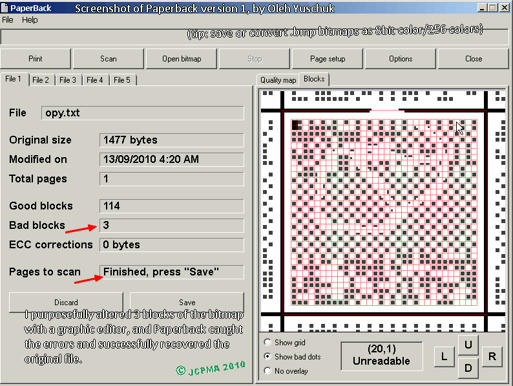
071 - PaperBack v.1.0 review

PaperBack v.1.0 review by JCP
===============
.What - back up (small) files to printed paper; OR a bmp steganography app.
.who - Oleh Yuschuk
.where - http://www.ollydbg.de/Paperbak/index.html
.when - today is Sept29-2010
.why - It is a neat concept.
.how -

PROS
- small 227KB; - Portable!; - v.innovative! -password encryption available!

CONS
- not practical for large size files:
(132kb jpg file : 3/4 page : 14.5mb bitmap);
(3 bytes txt file : 1/8 page : 2.2mb bitmap)
[ (3 bytes txt file : 1/8 page : 1.12mb bitmap) <== at extreme settings.] - need a nice printer and scanner - version 1. backs up 1 file at a time.

Unlimited Free Image and File Hosting at MediaFire


myNotes
~~~~~~~
IdealEquipment = 600dpi LaserPrinter; Scanner with 900dpi+ real resolution.
Inkjet printer limitation = maximal useful resolution 200dpi

You can save a file to a bmp by using "save to bmp" in the file menu.
Drag and drop is supported. But dropping a bmp will activate recognition/recovery.

Do not convert resultant bmps to other than 8bit-color, or recovery will be impossible.

Much thought went into coding this app. For example, Encryption algorithm,
drag&drop feature, Redundancy for correcting errors; Paper formatting; Data compression


Options:
~~~~~~~
Printing Options are:
Dot Density: use (120 or) 150 dpi. You store more data on a sheet of paper
with a higher dpi, but at the expense of requiring a nicer printer, and also a nicer
scanner for recovery of data. At 150 dpi setting, the programs suggests for recovery,
that you scan at a physical resolution of 450 dpi. Also, a higher dot density means a
smaller bmp file.
Dot size: author suggests 70%. The reason is that some white space around
the dot will help scanner recognition/dot distinction.
Compression: author suggests Maximal, unless you have a slow computer.
Redundancy: 1:5 means app's recovery algorithm allows 1 data-block to be
recovered, rebuilt in case of error for every 5 data=-blocks which are printed.
A smaller ratio, ie 1:10 would mean your resultant bmp or # of sheets to be printed
would be smaller. A higher ratio, ie 1:2 would mean your data is more safe. (For
my tests, i used 1:7)
Header and Footer: This option allows descriptive info for human eyes.
Border Around The Page: This should be checked; This improves autocropping
by twain drivers.

Decoding Options are:
Autosave complete files: when scanning multipage files, Paperback recognizes
the completion of scanning and prompts you to save your file.
Determine Best Quality: slows down recovery, but the app works better to
analyze and repair data.

Encryption Options are:
Encrypt data: This activates encrypting the backup.
Password in open text: whether or not pw is shown as you type it

MyResults (with MD5 checksums)
~~~~~~~~~
jpg0 = original file to be backed up. It is a 132 KB jpg image.

jpg0.jpg 132 KB (136,165 bytes) 4d8c2b60bdc77345b801b57a0573943c
jpg1.jpg 132 KB (136,165 bytes) 4d8c2b60bdc77345b801b57a0573943c
jpg2.jpg 132 KB (136,165 bytes) 4d8c2b60bdc77345b801b57a0573943c
jpg3.jpg 132 KB (136,165 bytes) 4d8c2b60bdc77345b801b57a0573943c

bmp1.bmp 14.5 MB (15,218,038 bytes) 8bit color baf58cb7192043ce31d9c8f58a3b98b5
bmp1.bmp.zip 449 KB
bmp1.bmp.jpg 8.88 MB (9,312,597 bytes) 8bit color
bmp1.bmp.jpg.zip 715 KB
bmp1.bmp.jpg.gif 3.39 MB (3,562,963 bytes) 8bit color
bmp1.bmp.jpg.gif.zip 3.39 MB
bmp2.bmp 14.5 MB (15,218,038 bytes) 8bit color b3373776f8c93f3515fb1cbbd7c30a15

bmp3.bmp 14.5 MB (15,218,038 bytes) 8bit color 8ca1d7f0431db0ff853f414e78151c8e

backup jpg0 file took 1 sheet of paper and filled up 3/4 of a page with dots.
backup jpg0 file with encryption took 1 sheet of paper and filled up 3/4 of a page with dots.


Explanation of results:
~~~~~~~~~~~~~~~~~~~~~~
My Printing Options used for the test:
DotDensity - 150dpi;
DotSize - 70%;
Compression - Maximal;
Redundancy - 1:7
Header & Footer - Yes;
Border Around the Page - Yes

Backing up the 132KB original file by saving to bmp resulted in a bmp file ("bmp1")
14.5MB with dimensions of 4192x3630 pixels at 8bit-color depth.
Next, I converted bmp1 to bmp1.jpg 8.9 MB, and then this I converted this to
bmp1.jpg.gif 3.4 MB. (Interestingly, zipping bmp1 gives you a zip file 449 kB). I
converted bmp1.jpg.gif to bmp2 and proceeded to recover the file. It worked perfectly.
The resultant jpg file, jpg2.jpg is identical to jpg0.jpg

Backing up jpg0.jpg using encryption to bmp3.bmp gave a bmp with identical size and
dimensions as bmp1.bmp, 4192x3630 pixels at 8bit-color depth. The MD5 hash was different
and visual inspection of the bmp image showed the dots were placed differently. Recovery
of this backup was successful: jpg3.jpg is identical to jpg0.jpg.

Tuesday, May 25, 2010

065 - CamerayShy test

065 - - steganography series: simple apps to encrypt things from your little brother or sister. CamerayShy test

CameraShy 0.2.23.1

CameraShy0.2.23.1.exe is a Windows based internet browser which encrypts and decrypts hidden text in .gif files.

camerashy-window.jpg (tinypic.com coverts gifs into jpgs), http://i45.tinypic.com/2wrdx8n.jpg
camerashy-window.gif mediafire.com, http://www.mediafire.com/file/xzzyatyjnyz/camerashy-window.gif
Image and video hosting by TinyPic

How to decrypt the two gif files:
three-marked-tabs.gif 6 Kb, md5-hash:d5977bbc65737bc74cf965b80de9aea4
Wikipedia-tab.gif 2 Kb, md5-hash:f552a6c0b9e56f17ccc377f7f29611d1

Step1. open the app, and type "password" into the password field and "[Hacktivismo]" into the signature field.
Step2. If online, select the gif on the webpage on the programs's bottom field.; If offline, select the gif using the upper clockwise direction blue arrow button.
Step3. when successfully decrypted, you can view the text in the upper small window, or by pressing the checkmark button, view the same text in the upper big window.

image links:
three-marked-tabs.gif, Photobucket, http://s556.photobucket.com/albums/ss4/jcpma/20100521stegano/?action=view&current=three-marked-tabs.gif
three-marked-tabs.gif
three-marked-tabs.gif, Box.net, http://www.box.net/steganography/1/43429648/440358266

Wikipedia-tab.gif, Photobucket, http://s556.photobucket.com/albums/ss4/jcpma/20100521stegano/?action=view&current=Wikipedia-tab.gif
Wikipedia-tab.gif
Wikipedia-tab.gif, Box.net, http://www.box.net/steganography/1/43429648/440358232

App. Package:
camerashy.zip, Mediafire, http://www.mediafire.com/file/mm3yizqqd32/camerashy.zip
camerashy.zip, Box.net, http://www.box.net/steganography/1/43429648/440358894

064 - EyeMage test

064 - - steganography series: simple apps to encrypt things from your little brother or sister. EyeMage test

EyeMage IIE version 0901 by Proporta Ltd

Eyemage can encrypt a file or some typed text into a bitmap.
The bitmap can be self-generated noise, or a pre-existing one.

Decrypting an pre-existing illustration bmp with a file hidden in it:
Step1. open EyeMage IIE.exe. click on the (right) `decrypt' button.
Step2. click the "Image" button & load/open the bitmap "eyemage-file-test-2k-content.bmp (49 Kb, md5-hash:2c51515ae01e2fb1cfb930b361645563). This is a picture of a yellow taxi cab.
Step3. click the lower right corner `decrypt' button. Enter "password" as the password.
Step4. A save window should appear, with the name of the hidden file, "eyemage-contents.zip" (2 Kb, md5-hash:ab7d998966de28465dc9331f01071b36). click "save" to complete the process.

Decrypting a self-generated "noisy" bitmap with a file hidden in it:
Step1. open EyeMage IIE.exe. click on the (right) `decrypt' button.
Step2. click the "Image" button & load/open the bitmap "eyemage-file-test-noise-9k-content.bmp (24 Kb, md5-hash:8d51baae375cf68bb91d49146e752786).This is a picture of a rectangle of static.
Step3. click the lower right corner `decrypt' button. Enter "password" as the password.
Step4. A save window should appear, but without any name or extension of the hidden file. also, the location of the save folder may be different. The actual name of the hidden file is: "eyemage-content.zip" (9 Kb, md5-hash:13303674805d3e4a3a0e7d4e1ca1db3e).

Notes:
* One advantage of the noisy bitmap encoding method is that it saves space. i.e., the resultant bitmap is 24 Kb holding 9 Kb of content. Compare this with using a pre-existing bitmap: ie 49 Kb containing 2 Kb of content.
* A disadvantage of the noisy bitmap encoding method is that it may work inconsistently. (ie Failure).
* Another disadvantage, as stated above, of the noisy bitmap method is that the hidden file name is not remembered.
* The minimum length of a password is 4 characters.

Decrypting a hidden text message within a bitmap:
Use the same process of decrypting as above, with these files:
"eyemage-text-test-portrait.bmp" 24 Kb, md5-hash:6de2af2abe79309da789130a4d4ac6a9. An icon sized picture of a portrait.
"eyemage-text-test-noise.bmp 15 Kb, md5-hash:16d8cf4b6bc65566cf4e57b4753822f3. A picture of a smaller block of static.
Both these files contain identical hidden text. On the Eyemage program, it should reveal a few lines of the alphabet & other text from the qwerty keyboard.

Links:
eyemage-file-test-2k-content.bmp Mediafire, http://www.mediafire.com/file/2mzdyrynzig/eyemage-file-test-2k-content.bmp
Unlimited Free Image and File Hosting at MediaFire
eyemage-file-test-2k-content.bmp Box.net, http://www.box.net/steganography/1/43429648/440359038

eyemage-file-test-noise-9k-content.bmp Mediafire, http://www.mediafire.com/file/dnglinz3mjj/eyemage-file-test-noise-9k-content.bmp
Unlimited Free Image and File Hosting at MediaFire
eyemage-file-test-noise-9k-content.bmp Box.net, http://www.box.net/steganography/1/43429648/440359048

eyemage-text-test-portrait.bmp Mediafire, http://www.mediafire.com/file/udyijukgtmz/eyemage-text-test-portrait.bmp
Unlimited Free Image and File Hosting at MediaFire
eyemage-text-test-portrait.bmp Box.net, http://www.box.net/steganography/1/43429648/440359090

eyemage-text-test-noise.bmp Mediafire, http://www.mediafire.com/file/nyehdzhmetj/eyemage-text-test-noise.bmp
Unlimited Free Image and File Hosting at MediaFire
eyemage-text-test-noise.bmp Box.net, http://www.box.net/steganography/1/43429648/440359064

App.Package:
eyemage.zip, Box.net, http://www.box.net/steganography/1/43429648/440359016
eyemage.zip, Mediafire, http://www.mediafire.com/file/mjqmdujdmgi/eyemage.zip

Friday, May 21, 2010

063 - jphs, jpeg hide & seek, test

063 - - steganography series: simple apps to encrypt things from your little brother or sister. "jphs"(jpeg hide and seek) test

jphs for windows version 0.5 by Allan Latham

Jphswin.exe = the program

This program encrypts a file into an existing jpg file. The hidden file size limitation should be about
1/10th the size of the jpg!


To "decrypt" the test file "jphs-test1.jpg" (approx 21 Kb, md5-hash:d894f502137973ae0a2182e32fb054d4. This is a picture of a happy face on a blue background):

Step1. Click on "Open jpeg" button & then choose jphs-test1.jpg
Step2. Click "Seek" button. A pass phrase window appears. The pass phrase is "password".
Step3. Next, a save file dialog window appears. Save the file with an arbitrary name like jphs-content.gif. (You have to enter the extension.)

If the process is successful, you will have a resultant .gif file approximately 2 Kb in size, md5-hash:21b5afd61cdebbaf4491ee748e0c6762.

Links:
box.net "jphs-test1.jpg" http://www.box.net/steganography/1/43429648/440359102

mediafire "jphs-test1.jpg" http://www.mediafire.com/file/yzbuwmmdoyg/jphs-test1.jpg :
Unlimited Free Image and File Hosting at MediaFire

photobucket "jphs-test1.jpg": http://i556.photobucket.com/albums/ss4/jcpma/20100521stegano/th_jphs-test1.jpg
jphs-test1.jpg

tinypic "jphs-test1.jpg": http://i50.tinypic.com/1zvsikp.jpg
Image and video hosting by TinyPic

.
mediafire: App.Pkg: jphswin.zip archive http://www.mediafire.com/file/mvmqwjn32dg/jphswin.zip
box.net: App.Pkg: jphswin.zip archive http://www.box.net/steganography/1/43429648/440359180

Thursday, May 6, 2010

062 - bmpPacker test

062 - - steganography series: simple apps to encrypt things from your little brother or sister. "bmpPacker" test

bmpPacker version 1.2a

This app. encodes a file into a self-generated "noisy" bitmap (.bmp) file.
When you view the resultant .bmp image, it looks like "noise" or "video snow".
The program is bmpPacker.exe. There is an accompanying file called bmpPacker.cfg.

The test-file to decrypt is "bmpPacker-test.bmp" 4 Kb, md5-hash:722479e25226ec9fe5315957e3263d2f.

Step1. Open bmpPacker.exe; use these "options": "blowfish", and "ascii" mode.
Step2. Click the "Encode/Decode" button and open the file "bmpPacker-test.bmp". This is a picture of a narrow strip of static.
Step3. Type into the window the passphrase "password" into both fields. Press "OK".

If successful, you will find a resultant "rich text file" (bmpPacker-content.rtf 2 Kb, md5-hash:3b81b00cb2766ee69918437a2146b6fe).

Notes:
* The information for the name and extension of the hidden file is contained in the bitmap.
* The program provides a self-generated CRC32 checksum; This is somewhat considerate and reassuring.
* The password has to be at least 8 characters long.


The bitmap generated from this test, in this instance, looks like a dark horizontal line.

This originally was the bmp uploaded image to blogger.com ; [Don't use this one as Blogger automatically converts bmp files to jpg (bmpPacker-test.jpg) ! --similarly, Tinypic.com and Photobucket.com also converts .bmp files to .jpg files] ; Use the links below.


image link at mediafire.com (bmpPacker-test.bmp); this black line below is the bitmap:
http://www.mediafire.com/file/2jezmlznzhg/bmpPacker-test.bmp

Unlimited Free Image and File Hosting at MediaFire


image link at box.net (bmpPacker-test.bmp):
http://www.box.net/steganography/1/43429648/440358398

App.Pkg:

link to bmpPacker app package at mediafire (bmpPacker.zip):
http://www.mediafire.com/?c1ymmjm22zi

link to bmpPacker app package at box.net (bmpPacker.zip):
http://www.box.net/steganography/1/43429648/440359498

.
.

http://mediafire.com/jcpmamediafire
mediafire= jcpmamediafire~~A~~m
#$%%
http://box.net/steganography
 
*re-jcpmaone-blogger* *re-jcpma-lv-cm-histats*